Best Construction CRM Software for Bid Tracking and Follow-Up for General Contractors
Missed follow-up is a quantified, real cost, not a vague inefficiency. FMI Corporation's 2025 research found that construction companies lose roughly 23% of qua..
Key Takeaways
Missed follow-up is a quantified, real cost, not a vague inefficiency. FMI Corporation's 2025 research found that construction companies lose roughly 23% of qualified leads to missed follow-ups and disorganized tracking. On $10M in annual bid pursuit, that's over $2M in forfeited opportunity from process alone, not lost bids on price or scope.
CRM, bid discovery, and project management solve three different problems that regularly get sold as one. A CRM organizes follow-up on opportunities already in the pipeline. It doesn't find new bids to pursue — that's a bid discovery tool — and it doesn't run the job once it's won — that's project management software. Buying a CRM to fix a thin pipeline won't work.
Purpose-built construction CRMs start ahead on bid-specific fields. JobNimbus, Followup CRM, and TopBuilder ship with bid pipeline stages, owner and architect relationship tracking, and construction-specific reporting out of the box. General CRMs (Pipedrive, Zoho, Salesforce) can be configured to fit, but that configuration is real setup work, not a checkbox.
A GC's pipeline is relationship-driven, not volume-driven. The bottleneck for most GCs isn't too many opportunities to track — it's making sure every live pursuit with an owner, architect, or repeat client gets a follow-up before it goes cold, and knowing which relationships and project types actually produce wins.
A standalone CRM earns its keep when the bottleneck is winning bids, not running active jobs. A contractor juggling a handful of overlapping active projects often already has the relationship data inside their PM platform; a second, unsynced contact system tends to create more admin than it saves.
Adoption is the real cost, not just the subscription price. AGC and Sage's 2024 Construction Hiring and Business Outlook found 43% of contractors cite finding the time to set up and train on new technology as their top IT challenge — worth weighing against any platform's feature list before buying.
This guide is built around the general contractor's side of the bid cycle: pursuing owner and architect relationships, tracking a proposal from first contact through signed contract, and knowing which pursuits actually convert into work. Subcontractor bid tracking is a related but different problem — a high volume of invitations to bid rather than a smaller number of owner relationships — and gets a brief note of its own further down, but it isn't the focus here.
What Does a Construction CRM Actually Do (and What It Doesn't)?
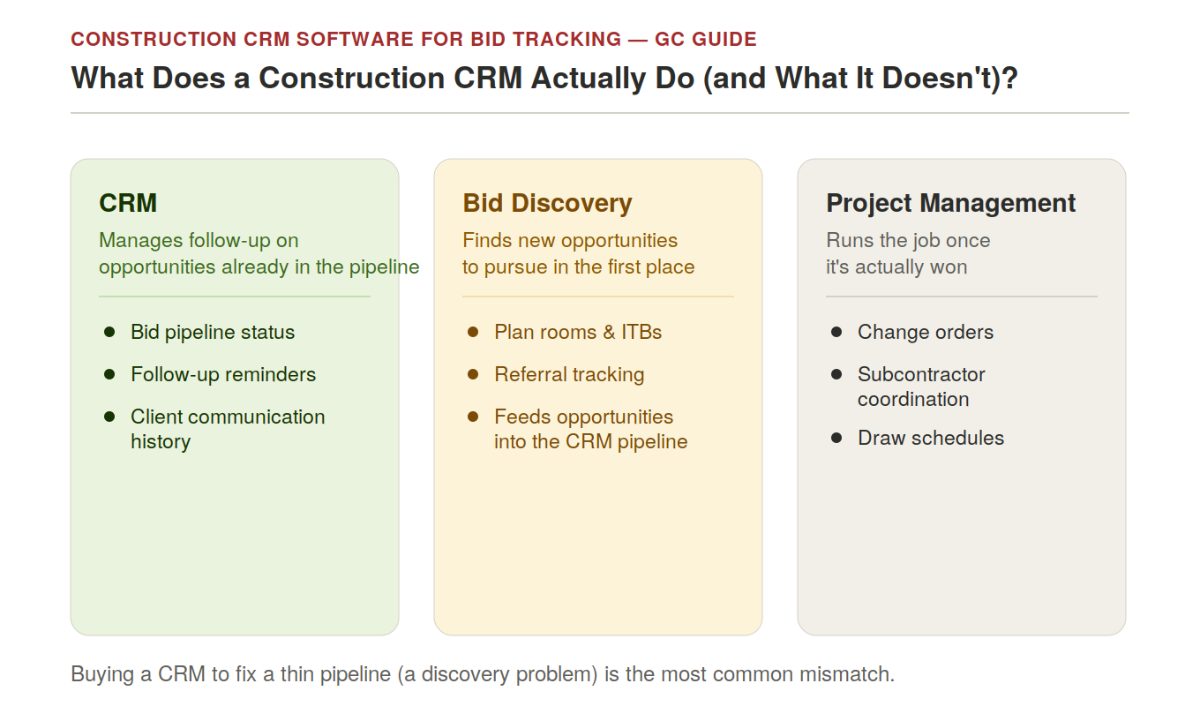
A construction CRM centralizes leads, bid pipeline status, and client communication history in one place — replacing the inbox-and-spreadsheet system most contractors default to. At its core, it answers three questions reliably: which bids are outstanding, who owes a follow-up and when, and which lead sources actually convert into signed work.
It's worth being precise about what a CRM is not, because the category gets blurred in vendor marketing constantly:
A CRM is not a bid discovery tool. Finding new bid opportunities — plan rooms, invitations to bid, referral tracking — is a separate problem from managing the ones already in the pipeline. A contractor with a thin pipeline has a discovery problem; better follow-up discipline on too few opportunities won't fix it.
A CRM is not a project management platform. Once a contract is signed, change orders, subcontractor coordination, draw schedules, and daily field logs are a different workflow with different tools (Procore, Buildertrend, and similar platforms bridge both, which is part of why they show up in CRM conversations at all).
A CRM is not an estimating tool. Pipeline stages and follow-up reminders don't replace takeoff and pricing — a CRM tracks the status of a bid, not the buildup of the number inside it.
A platform that blends two or three of these — Buildertrend and Procore both do, deliberately — isn't wrong for doing so, but it's worth knowing which problem is actually being solved before evaluating features against it.
Master Comparison Table
Software | Category | Best For | Construction-Specific | Starting Price |
JobNimbus | Purpose-built construction CRM + light PM | Most construction companies, roofing/exterior-rooted | Yes | $150/mo (team of 5) |
Followup CRM | Purpose-built construction CRM | Firms wanting bid tracking + AIA billing integration | Yes | $55/user/mo |
TopBuilder | Purpose-built construction CRM + BI | Commercial contractors wanting bid analytics | Yes | Custom quote |
Buildertrend | All-in-one CRM + PM | Residential builders and remodelers | Yes | Tiered subscription |
Pipeline CRM | Visual pipeline CRM | Small-to-mid GCs wanting simple visual bid tracking | Partial | Custom quote |
Pipedrive | General visual pipeline CRM | Budget-conscious teams wanting simple deal-stage tracking | No | $14–79/user/mo |
Zoho CRM | General automation-focused CRM | SMBs wanting customizable workflows on a budget | No | Free (3 users)–$65/user/mo |
Salesforce (construction-customized) | Enterprise general CRM | Large contractors needing deep analytics and custom builds | No (customized) | $75–300/user/mo + implementation |
DelveAnt | AI-native CRM | Teams wanting automatic call/email capture with no manual entry | No | Custom quote |
Purpose-Built Construction CRMs
These platforms were designed around bid cycles and contractor relationships from the start, rather than being adapted from a generic sales tool.
JobNimbus combines construction-specific lead tracking, bid pipeline stages, and light job scheduling in one platform at $150/month for a team of five. It was originally built for roofing and exterior contractors and has since expanded to general contractors, specialty trades, and remodelers — the roofing roots still show in some of its default workflows, but the core bid-pipeline functionality generalizes well.
Best for: Contractors wanting bid tracking and light project handoff in one system without a steep setup curve.
Tradeoff:Less depth than a dedicated PM platform once a project moves past the early stages.
Followup CRM is built exclusively for construction, with AIA billing document integration and a bid pipeline designed around construction-specific stages rather than generic sales deal stages. Pricing runs $55/user/month.
Best for: Firms whose main pain point is literally "we forget to follow up" — the platform is built around visible due dates and next steps rather than broader sales automation.
Tradeoff: Narrower feature set than an all-in-one platform; doesn't extend into active project management.
TopBuilder pairs CRM and bid management with ContractorBI, a business-intelligence layer purpose-built for contractor dashboards — win rates by GC relationship, project type, and customer profitability. It also integrates directly with Procore, Sage, Viewpoint, STACK, and BuildingConnected rather than requiring a workaround.
Best for: Commercial contractors who want bid analytics (which GC relationships and project types actually drive wins) alongside pipeline tracking.
Tradeoff:More setup and cost than a lightweight bid-tracking tool; the BI layer is only valuable if someone on the team will actually use it.
Buildertrend covers lead management, proposals, and pipeline tracking alongside full project management, aimed at residential builders and remodelers who want both sides of the business — winning jobs and running them — in one platform.
Best for: Residential builders and remodelers who want a single system rather than a CRM plus a separate PM tool.
Tradeoff: Less CRM depth than a dedicated bid-tracking platform for firms whose primary bottleneck really is follow-up discipline, not active job management.
Pipeline CRM: The Visual Option for Smaller GCs
Pipeline CRM offers a straightforward, drag-and-drop pipeline view with unlimited seats, making it accessible for smaller GC teams that want visual clarity on where each bid stands without a steep setup curve. It also integrates with Procore, which matters for GCs whose broader operations already run on that platform.
Best for: Small-to-mid GCs wanting simple, visual bid-stage tracking without extensive configuration.
Tradeoff:Lighter on construction-specific reporting than JobNimbus or TopBuilder — the value is in visual simplicity, not deep analytics.
A brief note for subcontractors: the CRM math is different on the sub side of the table. A subcontractor's pipeline is built around a high volume of invitations to bid (ITBs) arriving from many GCs at once, with go/no-go decisions and GC-relationship tracking mattering more than the owner-facing proposal workflow this guide focuses on. Purpose-built sub-side tools like Downtobid exist specifically for that workflow, but they're a different buying decision than the one this article is built around.
General CRMs Configured for Construction
These weren't built for contractors, but flexible configuration can make them workable — at the cost of setup time a purpose-built tool doesn't require.
Pipedrive is a visual, drag-and-drop pipeline CRM with an AI Sales Assistant that suggests follow-ups and coaches on deal performance. Its simplicity is the appeal: a functional bid pipeline can be running with minimal configuration, at $14–79/user/month depending on tier.
Best for:Budget-conscious teams that want pipeline visibility without construction-specific complexity.
Tradeoff:No native construction fields — bid stages, GC relationships, and reporting all have to be built manually.
Zoho CRM is an automation-focused platform with a genuinely free tier for up to three users, making it a real option for a very small contractor office. Teams willing to invest setup time can build bid-tracking workflows and automated follow-up sequences.
Best for:Small teams wanting to build a custom-fit pipeline without upfront cost.
Tradeoff: The automation value only shows up after real configuration work; out of the box, it's a generic CRM.
Salesforce with construction customization provides the deepest analytics and automation available in this category, at $75–300/user/month plus $5,000–15,000 in typical implementation costs.
Best for: Enterprise contractors with complex sales operations and the budget to customize and maintain a Salesforce build. Tradeoff: Cost and implementation complexity make it impractical below a certain firm size.
The AI-Native Layer: Automated Capture and Follow-Up
A newer entrant class skips manual data entry almost entirely. DelveAnt captures calls and syncs emails automatically, updating the deal record by the time a site call ends — no Sunday-night catch-up on the CRM. Its AI chat feature answers plain-language questions like "which bids need follow-up this week?" directly, and the mobile app is a full workspace rather than a stripped-down viewer.
Best for: Small-to-mid teams that want pipeline and follow-up tracked without dedicating staff time to maintaining the CRM itself. Tradeoff: Newer category with less of a construction-specific track record than the purpose-built platforms above; worth confirming reporting depth matches what a growing team will eventually need.
CRM vs. Bid Discovery: Make Sure You're Solving the Right Problem
This distinction is worth its own callout because it's a common, expensive mistake: a CRM improves follow-up discipline on opportunities that are already in the pipeline. It does nothing for a pipeline that's thin because the team isn't finding enough qualified bids in the first place. If the real problem is bid volume, a bid discovery or plan-room platform addresses that upstream problem; layering better follow-up automation on top of too few opportunities won't move the win-rate needle. Diagnose which problem is actually being solved before buying either one.
How to Evaluate Construction CRM Software
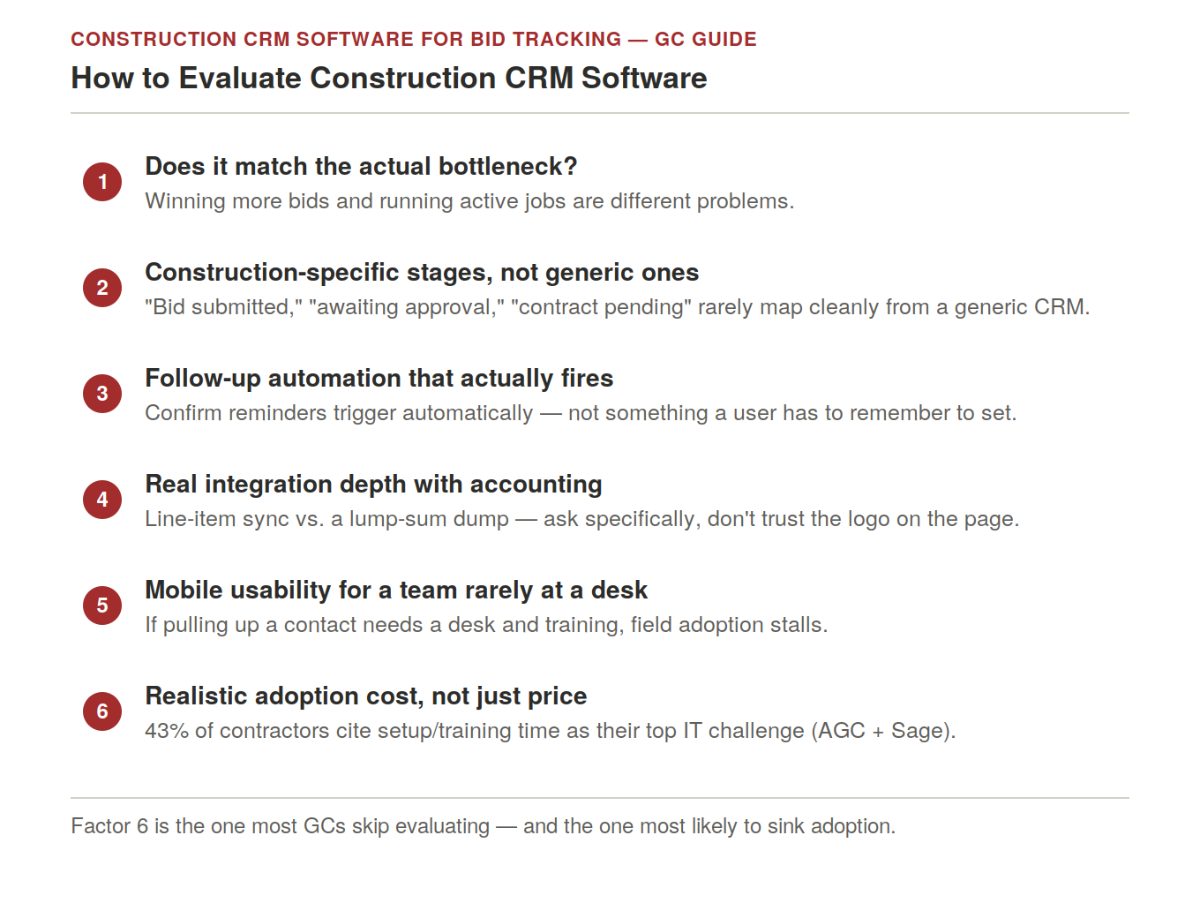
Six factors, in order:
Does the tool match the actual bottleneck. Winning more bids and running active jobs are different problems — confirm which one is the constraint before comparing feature lists.
Construction-specific pipeline stages vs. generic deal stages. "Bid submitted," "awaiting approval," "contract pending" are meaningfully different states in a construction sales cycle; a generic CRM's default stages usually don't map cleanly without setup work.
Follow-up automation that actually fires. A reminder that triggers when an owner hasn't responded in a set window is the single feature most directly tied to the lost-lead numbers cited earlier — confirm it's automatic, not something a user has to remember to set manually.
Integration depth with accounting, not just a logo on the page. A "connects to QuickBooks" claim can mean line-item sync or a lump-sum dump — ask specifically whether retainage is handled as a separate receivable and whether cost codes map cleanly, since a bad sync creates more reconciliation work than the spreadsheet it replaced.
Mobile usability for a team that's rarely at a desk. If pulling up a contact record requires sitting down and a training session, field adoption stalls regardless of how good the desktop version is.
Realistic adoption cost, not just subscription price. With 43% of contractors citing new-technology setup and training as their top IT challenge, the true cost of a platform includes the time to get a team actually using it, not just the monthly fee.
How the Stack Looks by Contractor Type
Contractor Type | Recommended CRM Approach | Notes |
Small residential GC / remodeler | Buildertrend, or Followup CRM if PM is handled elsewhere | Prioritize simplicity and fast onboarding over deep analytics |
Small-to-mid commercial GC | Pipeline CRM or JobNimbus | Visual bid tracking without a steep setup curve |
Mid-size commercial GC | JobNimbus or TopBuilder | Construction-specific bid stages plus reporting on which owner/architect relationships and project types actually win |
Budget-conscious small GC | Zoho CRM or Pipedrive | Real cost savings if the team will actually invest the setup time |
Enterprise GC with complex sales ops | Salesforce with construction customization | Budget for implementation cost alongside the subscription |
Frequently Asked Questions
What is the best construction CRM for bid tracking?
There's no single best platform — it depends on contractor type and bottleneck. JobNimbus and Followup CRM lead for purpose-built bid pipeline tracking at small-to-mid GCs. TopBuilder adds bid analytics for commercial contractors. Downtobid and Pipeline CRM are built specifically for subcontractor ITB workflows. Salesforce with construction customization leads for enterprise sales operations.
Do I need a separate CRM if I already use project management software?
Not always. If the firm is managing a handful of overlapping active projects, the PM platform often already contains the relationship data a CRM would duplicate — adding a second, unsynced contact system tends to create more admin than it saves. A standalone CRM earns its cost specifically when the bottleneck is winning more bids, not running the ones already underway.
How much revenue is actually lost to poor follow-up?
FMI Corporation's 2025 research found construction companies lose roughly 23% of qualified leads to missed follow-ups and disorganized tracking. On $10M in annual bid pursuit, that's over $2M in forfeited opportunity from process alone — separate from bids lost on price or scope.
What's the difference between a CRM and a bid discovery tool?
A CRM manages follow-up and pipeline visibility on opportunities already identified. A bid discovery tool finds and qualifies new opportunities — plan rooms, invitations to bid, referral sources — before they ever enter a pipeline. A thin pipeline is a discovery problem; a CRM won't fix it.
Is a general CRM like Pipedrive or Zoho good enough for a construction company?
It can be, particularly for budget-conscious small teams willing to invest setup time building construction-specific pipeline stages and fields. Purpose-built construction CRMs arrive with that structure already in place, which is the tradeoff: less setup work versus lower subscription cost.
How is a subcontractor's CRM need different from a GC's?
A GC's pipeline centers on a smaller number of owner and architect relationships moving toward a signed contract, with reporting on which relationships and project types produce wins. Subcontractors instead handle a much higher volume of invitations to bid (ITBs) from many GCs at once, where go/no-go decisions matter more than deep proposal customization — a genuinely different tool, like Downtobid, tends to fit that workflow better than a GC-oriented platform configured after the fact.
What should I check before trusting a CRM's "integrates with QuickBooks" claim?
Ask whether the sync pushes line-item detail or just a lump sum, whether retainage is handled as its own receivable, and whether cost codes map cleanly between systems. A shallow integration creates reconciliation work that can be worse than the manual process it was meant to replace.
Do AI-native CRMs like DelveAnt replace the need for a construction-specific platform?
Not necessarily; they solve a different part of the problem, automatic data capture instead of manual entry, rather than a construction-specific pipeline structure. Some teams pair automatic capture with construction-specific fields; others find a purpose-built platform's default structure is enough on its own.
Related Building Code Resources
- Building CodesGo/No-Go Readiness Checklist for Construction Project Pursuit Decisions
- Building CodesBest Construction Document Control Software in 2026
- Building CodesBest Construction Estimating Software for Mac in 2026
- Building CodesAddenda in Construction: Definition, Purpose, and How to Manage Them
- Building CodesBest Construction Estimating Software in the UK Compared
MeltPlan
A curated stream of preconstruction intelligence, estimating innovation, takeoff breakthroughs, workflow advancements, and expert perspectives—powered by the AI and technology shaping the future of construction.
Visit SiteDon't miss what's shaping AEC
The latest on preconstruction, codes, AEC news & trends — so you're always in the know.