Best Construction Estimating Software for Mac in 2026
Most construction estimating software was built Windows-first. PlanSwift, Sage Estimating, and HCSS HeavyBid are native Windows desktop applications — histori..
Key Takeaways
Most construction estimating software was built Windows-first. PlanSwift, Sage Estimating, and HCSS HeavyBid are native Windows desktop applications — historically forcing Mac users into Boot Camp or Parallels just to open them.
Cloud-based, browser-native platforms have closed the gap. STACK, CostMiner, Buildxact, ProEst, and JobTread run entirely in a browser, which means macOS support isn't a workaround bolted on afterward — it's the native experience.
"Mac compatible" on a vendor listing doesn't always mean Mac-native. Some software marked Mac-compatible in directory listings is actually Windows software accessed through a hosted remote desktop or emulation layer — worth confirming directly before you buy, not after.
If the right tool for the trade is still Windows-only — HCSS HeavyBid for heavy civil is the clearest example — Parallels Desktop or a cloud-hosted Windows VM are the two realistic paths. Both add cost and setup, but neither is a dealbreaker.
Segment still matters more than Mac support alone. A residential remodeler and an enterprise GC need very different platforms; Mac compatibility narrows the shortlist, it doesn't replace the underlying decision.
Mac users evaluating construction estimating software run into a problem that doesn't show up in most buying guides: a lot of the category's most established names are Windows desktop applications, full stop. That's not a minor UX inconvenience; it's the difference between opening a tool natively and running Boot Camp, Parallels, or a remote desktop session just to build an estimate. This article separates what's genuinely Mac-native in 2026 from what merely claims Mac compatibility, and covers the realistic options when the best tool for a specific trade still happens to be Windows-only.
Why Mac Compatibility Is Still a Real Problem in Construction Software
Construction estimating software grew up alongside Windows-native CAD and takeoff workflows through the 2000s and 2010s, and several category leaders never fully left that foundation. PlanSwift, Sage Estimating, and HCSS HeavyBid remain Windows desktop applications at their core. For a Mac-based estimator, that has historically meant three choices: run Boot Camp to dual-boot into Windows, run Parallels or VMware Fusion to virtualize Windows alongside macOS, or hand the estimating work to whoever on the team has a PC.
What's changed is that cloud-based, browser-first platforms have matured into genuine substitutes rather than stripped-down alternatives. A browser-based estimating tool doesn't have a "Mac version" as a separate build; it simply runs the same way on any operating system with a modern browser, which means Mac support isn't an afterthought; it's structurally guaranteed by how the product is built.
The catch: not every "Mac compatible" listing in a software directory means what it sounds like. Some entries mean genuinely browser-based and OS-agnostic. Others mean the vendor offers a hosted Windows session, Mac users can access remotely — technically usable from a Mac, but not native, and with the added latency and occasional friction of any remote desktop tool. Confirming which kind of "Mac compatible" you're looking at is the single most useful question to ask before signing up for a trial.
Two Kinds of "Mac-Native": Browser-Based vs. True Native Apps
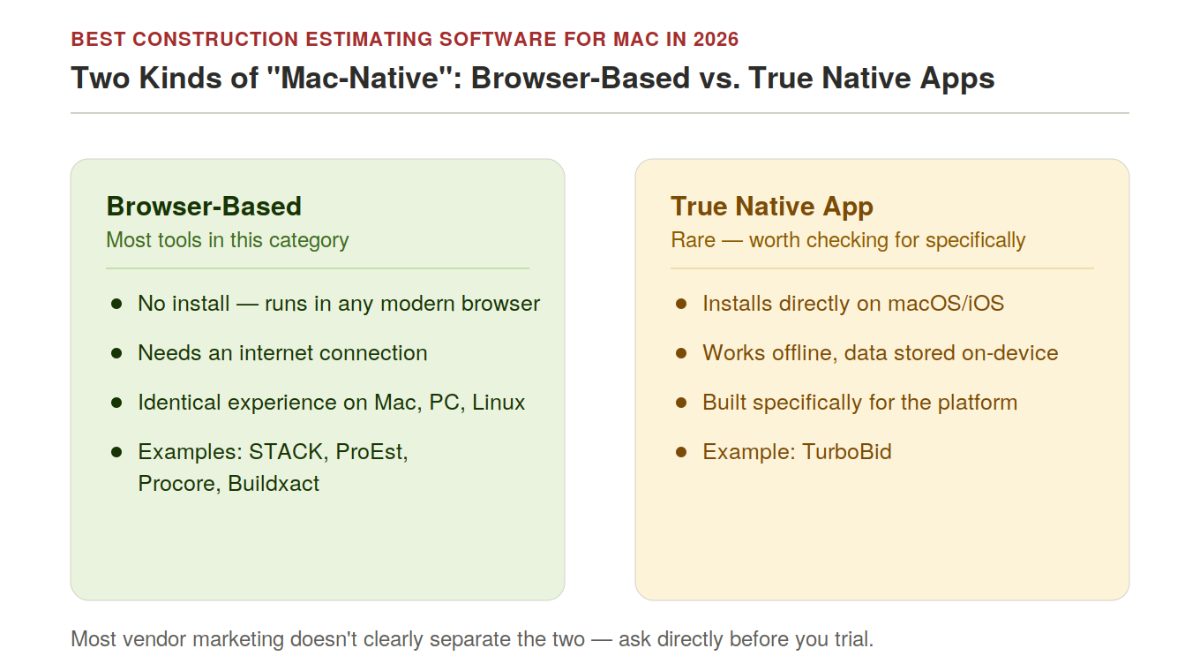
Most of the software in this article is Mac-compatible because it's browser-based — it doesn't have a "Mac version" because there's nothing OS-specific to build. That covers the large majority of genuinely usable options. But there's a second, smaller category worth knowing about: software with an actual native macOS or iOS app, not just a web app opened in Safari.
TurboBid is a clear example; it stores data on-device across iOS, Android, and Mac and syncs between them, including offline functionality a browser-based tool can't fully match on a job site with no signal. For estimators who want an app that behaves like a native piece of software rather than a browser tab — offline access, on-device storage, platform-specific performance — that distinction is worth checking for directly, since most vendor marketing doesn't clearly separate "runs in any browser" from "has a native macOS/iOS build."
Master Comparison Table: Genuinely Mac-Native Platforms
Software | Type | Best For | True Mac-Native | Starting Price |
STACK | Cloud takeoff + estimating | Mid-size GCs and subs wanting integrated takeoff | Yes — browser-based | $1,899–$2,999/yr |
CostMiner | Cloud takeoff + estimating | Firms wanting a Mac-first design without third-party takeoff tools | Yes — browser-based, built Mac-first | 14-day free trial, custom pricing |
ProEst (Autodesk) | Cloud, BIM-integrated | Larger commercial GCs on the Autodesk stack | Yes — browser-based | Custom quote |
Procore | Cloud, all-in-one PM + estimating | Large GCs standardizing estimating inside a broader PM platform | Yes — browser-based | Volume-based (custom quote) |
Buildxact | Cloud residential/light commercial | Small-to-mid builders wanting speed | Yes — browser-based | Custom quote |
JobTread | Cloud project + cost management | Small teams wanting estimating, scheduling, and job costing together | Yes — browser-based | Custom quote |
Contractor Foreman | Cloud all-in-one | Small contractors wanting the lowest-cost all-in-one option | Yes — browser-based | $49/mo per company |
Square Takeoff | Cloud takeoff + estimating | Small residential contractors and remodelers | Yes — browser-based | Custom quote |
Clear Estimates | Cloud estimating | Small businesses wanting simple, guided estimating | Yes — browser-based | Custom quote |
Houzz Pro | Cloud design + estimating | Residential remodelers wanting design and estimating together | Yes — browser-based | Tiered subscription |
TurboBid | Native Mac/iOS app | Estimators wanting on-device, offline-capable software, not a browser tab | Yes — true native app | Custom quote |
Haqq Takeoff | Cloud takeoff, free | Students, educators, and budget-conscious small businesses | Yes — browser-based | Free |
RSMeans Data Online | Cloud cost data reference | Any Mac-based estimator needing reference unit cost data | Yes — browser-based | $2,195–$6,735/yr |
Takeoff and Estimating: The Core Mac-Native Tools
STACK pairs cloud-based takeoff with estimating and explicitly markets itself as Mac and PC compatible — not as a caveat, but as a structural fact of being a browser-based platform. AI Assist automatically detects doors, windows, and rooms from uploaded plans, and independent benchmark testing has shown the AI-assisted takeoff landing within 3% of baseline accuracy.
CostMiner is built specifically around eliminating the Mac-compatibility problem — its own positioning leads with "Mac-compatible construction estimating software," and the product includes built-in takeoff so Mac users don't need to pair it with a separate Windows-only measurement tool. It offers a 14-day free trial with no credit card required.
ProEst, under Autodesk, runs as a cloud platform accessible from any browser, with deep BIM integration for firms pulling quantities directly from Revit models — a workflow that works the same whether the estimator is on a Mac or a PC.
Procore is worth calling out separately because it's the dominant name in construction management broadly, and it's easy to assume a platform this large must have Windows dependencies somewhere. It doesn't — Procore runs entirely in the browser, with its estimating module living inside the same system as project management, financials, and field tools. For a Mac-based GC that wants to estimate as one piece of a broader system of record rather than a standalone tool, Procore is a genuine option, not a workaround.
Best for: Firms whose core need is takeoff-to-estimate speed, with the choice between STACK, CostMiner, and ProEst largely coming down to whether BIM integration (ProEst) or a Mac-first design philosophy (CostMiner) matters more. Procore is the right call instead when estimating needs to live inside a larger PM platform.
Residential and Small-Contractor Estimating on Mac
Buildxact runs entirely in the browser and has been recognized as a strong overall pick for residential and light commercial builders, with its AI assistant Blu helping compress estimate turnaround time.
JobTread combines estimating with scheduling, bidding, and job costing in one cloud platform, rating well for fast onboarding among small teams regardless of operating system.
Contractor Foreman is the lowest-cost all-in-one option in this segment at $49/month for the whole company, running as a cloud platform with no Mac-specific limitations.
Houzz Pro combines residential design tools with estimating, appealing to remodelers who want both in one Mac-accessible platform.
Best for: Residential remodelers and small contractors who want fast onboarding without worrying about OS compatibility as a separate evaluation step.
The Free Option for Mac
Haqq Takeoffis a genuinely free, cloud-based takeoff tool aimed at students, educators, and small businesses that need to build a bid without a subscription commitment. It won't match the depth of a paid platform's cost database or reporting, but for a portfolio-builder, a student learning the workflow, or a very small operation doing occasional estimates, it removes cost as a barrier entirely — and being browser-based, it's fully usable on Mac with no workaround required.
Best for: Students, educators, and budget-conscious small businesses who need a working takeoff tool without committing to a paid platform yet.
Cost Data Reference on Mac
RSMeans Data Online deserves its own mention here because it's frequently assumed to be a Windows-only enterprise tool when it's actually a browser-based subscription — fully usable from a Mac. For any estimator building unit-cost estimates in a Mac-native takeoff tool, RSMeans remains the industry-reference dataset, with 97,000+ line items across 970 markets updated quarterly for volatile materials.
When the Right Tool Is Windows-Only: How to Handle It on a Mac
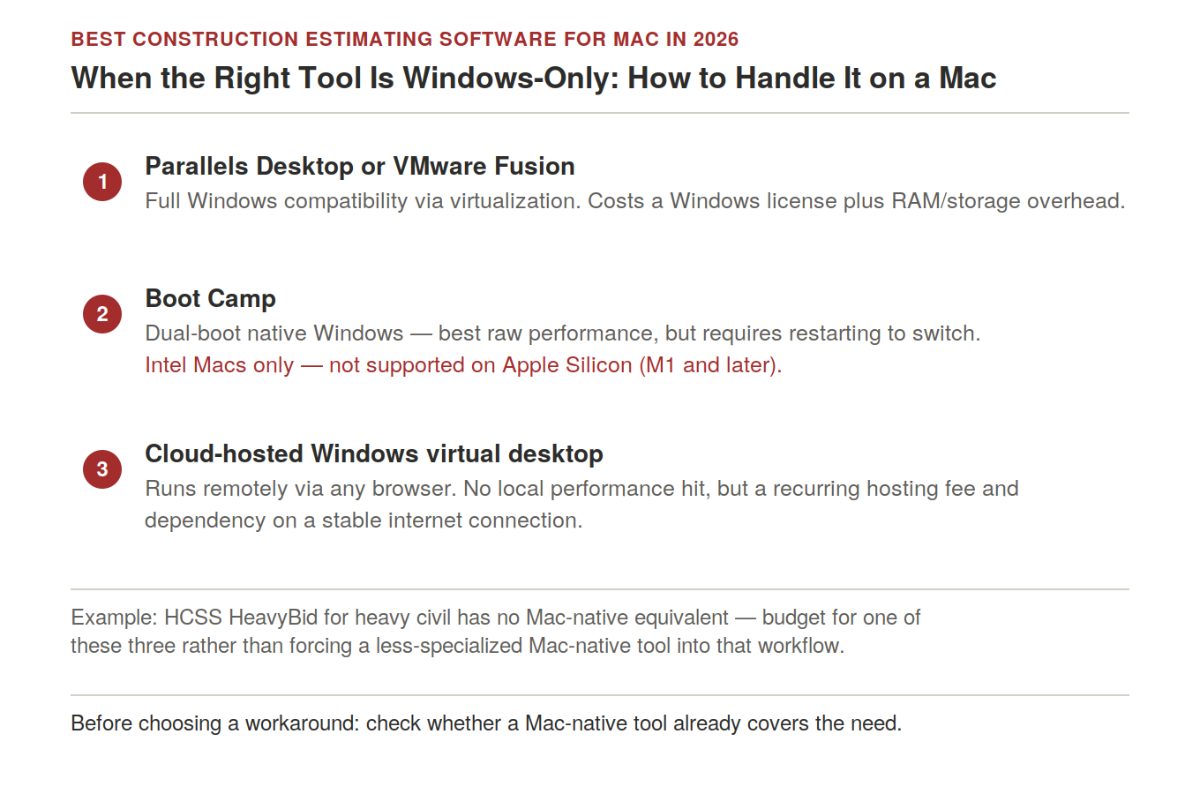
Sometimes, the best-fit tool for a specific trade or project type genuinely is Windows-only. HCSS HeavyBid remains the established specialist for heavy civil and highway contractors, where DOT-specific bid formats matter more than platform convenience. PlanSwift and Sage Estimatingare both still primarily Windows desktop applications despite occasionally appearing in "Mac compatible" directory listings — those listings typically mean the vendor supports a remote access workaround, not a native build.
Three realistic paths for a Mac user who needs one of these specifically:
Parallels Desktop or VMware Fusion. Runs Windows in a virtual machine alongside macOS. Full compatibility with the Windows application, at the cost of a Windows license, additional RAM/storage overhead, and one more piece of software to maintain and update.
Boot Camp. Dual-boots into a full native Windows installation. Better raw performance than virtualization for demanding applications, but requires restarting into Windows rather than running it alongside macOS — a real friction cost for someone estimating in Windows software while also needing Mac-native tools like email and accounting software open at the same time. Note that Boot Camp is only available on Intel-based Macs; Apple Silicon Macs (M1 and later) don't support it.
A cloud-hosted Windows virtual desktop. Several hosting providers offer a Windows session accessible from any browser or remote desktop client, shifting the computing to a remote server rather than the local Mac. This avoids local performance and storage tradeoffs entirely, at the cost of a recurring hosting fee and dependency on a stable internet connection.
None of these is free, and none is as clean as a genuinely Mac-native tool — which is exactly why it's worth checking whether a Mac-native alternative (STACK for general takeoff, for example) can cover the same need before committing to a workaround for a Windows-only specialist tool.
How to Verify "Mac Compatible" Claims Before You Buy
Directory listings aren't always precise about what "Mac compatible" means. Before trusting a listing:
Ask directly whether it's browser-based or requires a downloaded Windows executable. A vendor that hesitates to answer this plainly is usually describing a remote-access workaround, not native support.
Check for a dedicated macOS app versus a web-only app. Both are genuinely Mac-usable, but a web-only app depends entirely on browser performance and internet connectivity in a way a native app doesn't.
Run the free trial on the actual Mac hardware the team will use, not a company PC, before committing. Performance and interface quirks on Mac sometimes only show up in real use.
Search for Mac-specific complaints in user reviews. Capterra and G2 reviews often flag platform-specific friction that marketing pages don't mention.
How the Stack Looks by Firm Type
Firm Type | Recommended Mac-Native Stack | Notes |
Solo residential contractor/remodeler | Houzz Pro or Contractor Foreman | Lowest cost, fastest onboarding, no OS workaround needed |
Small-to-mid GC, general commercial | STACK or Buildxact, plus RSMeans Data Online for cost reference | Covers takeoff through estimate without leaving the browser |
BIM-heavy commercial/design-build | ProEst | Native Mac access with Revit-integrated quantity extraction |
Heavy civil/highway contractor | HCSS HeavyBid via Parallels or a hosted Windows VM | No genuinely Mac-native heavy civil specialist exists yet — budget for the workaround |
Firm standardized on Sage or PlanSwift for other reasons | Parallels/Boot Camp for that specific tool, Mac-native tool for everything else | Isolate the Windows-only tool rather than forcing the whole stack through emulation |
Frequently Asked Questions
Is there construction estimating software that works natively on Mac?
Yes. STACK, CostMiner, ProEst, Buildxact, JobTread, Contractor Foreman, Clear Estimates, Houzz Pro, and RSMeans Data Online are all genuinely browser-based, meaning they run the same way on macOS as on Windows with no emulation required.
Does Sage Estimating work on Mac?
Not natively. Sage Estimating is a Windows desktop application. Mac users who need it specifically typically run it through Parallels Desktop, Boot Camp, or a hosted Windows virtual desktop rather than a native macOS build.
What's the difference between "Mac compatible" and "Mac-native" software?
Mac-native means the software is browser-based or has a dedicated macOS build, running the same way it would on any other operating system. "Mac compatible" in some directory listings actually means the vendor offers remote access to a Windows-hosted version — technically usable from a Mac, but with the latency and friction of any remote desktop session, not a true native experience.
Can I run PlanSwift or HCSS HeavyBid on a Mac?
Yes, but not natively. Both are Windows desktop applications. The realistic paths are Parallels Desktop or VMware Fusion (virtualization), Boot Camp (dual-boot, Intel Macs only), or a cloud-hosted Windows virtual desktop accessed through a browser.
Do I need Boot Camp or Parallels if I use a cloud-based estimating platform?
No. Cloud-based platforms like STACK, ProEst, and Buildxact run entirely in a browser and require no Windows emulation at all — that's the core advantage of choosing a browser-based tool over a Windows desktop application in the first place.
Can Apple Silicon Macs (M1, M2, M3, M4) run Windows construction software?
Not through Boot Camp — that option is Intel-only. Apple Silicon Mac users needing a Windows-only application should use Parallels Desktop (which supports Apple Silicon with a Windows-on-ARM license) or a cloud-hosted Windows virtual desktop instead.
Does Procore work on Mac?
Yes, fully. Procore is entirely browser-based, including its estimating module — there's no Windows dependency anywhere in the platform. It's a genuine option for Mac-based GCs who want estimating integrated into a broader project management system rather than run as a standalone tool.
Is there a free construction estimating tool that works on Mac?
Yes. Haqq Takeoff is a genuinely free, browser-based takeoff tool aimed at students, educators, and small businesses, with no Mac-specific limitations since it's cloud-based. It won't match a paid platform's cost database depth, but it's a real option for occasional use or learning the workflow without a subscription.
Related Reading
The Best CRM for Architecture Firms in 2026: AEC-Specific vs. General-Purpose Platforms Compared
The Best Project-Based Billing Software for Architectural and Engineering Firms in 2026
BIM Construction Software: The Complete Guide for Architects and Engineers
Related Building Code Resources
- Building CodesGo/No-Go Readiness Checklist for Construction Project Pursuit Decisions
- Building CodesBest Construction Document Control Software in 2026
- Building CodesAddenda in Construction: Definition, Purpose, and How to Manage Them
- Building CodesBest Construction CRM Software for Bid Tracking and Follow-Up for General Contractors
- Building CodesBest Construction Estimating Software in the UK Compared
MeltPlan
A curated stream of preconstruction intelligence, estimating innovation, takeoff breakthroughs, workflow advancements, and expert perspectives—powered by the AI and technology shaping the future of construction.
Visit SiteDon't miss what's shaping AEC
The latest on preconstruction, codes, AEC news & trends — so you're always in the know.