Construction Document Control: Best Practices for Managing Project Documents
Document control and document management are not the same discipline. Management is storage and retrieval; control adds version supersession, approval workflows..
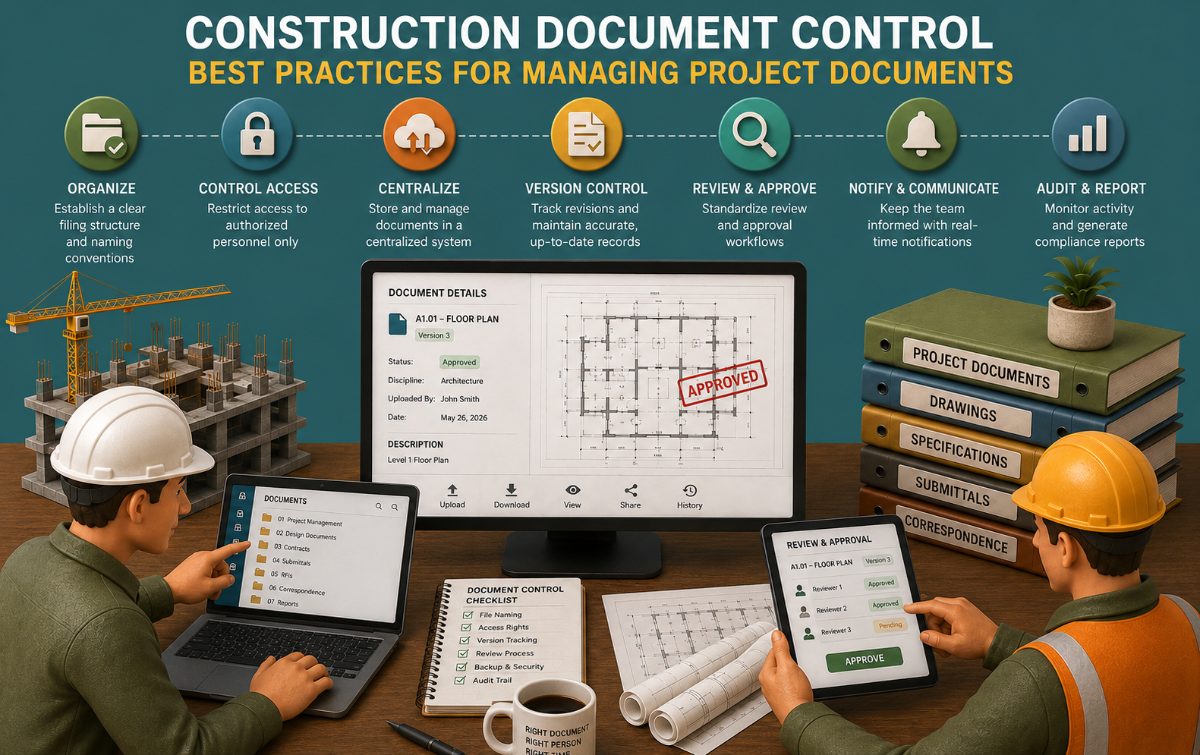
Contents
Key Takeaways
Document control and document management are not the same discipline. Management is storage and retrieval; control adds version supersession, approval workflows, and audit trails — and control is the piece that actually prevents field errors.
The single highest-value practice is automatic version supersession. A superseded drawing that still looks current to a field crew is the most common documented cause of construction rework.
Bid and procurement documents — subcontractor proposals, scope letters, qualifications, exclusions- are project documents too, and they fail plan review's cousin, buyout, more often than any other category because they arrive unstructured and get compared manually under deadline pressure.
A records retention policy has to be set before project closeout, not after a claim arrives. Most states enforce a statute of repose of four to fifteen years, and the standard advice is to retain project records for that period plus a two-to-three-year safety margin.
Document control failures are rarely a single missing tool. They're usually a missing convention — no naming standard, no version protocol, no defined approval chain — that any tool, free or paid, will fail to fix on its own.
Every general contractor has lived some version of the same failure: a foreman installs from a drawing that was superseded two revisions ago, an estimator awards a subcontract to a bid that looked competitive but was missing $200,000 in scope, or a certificate of insurance expires mid-project and nobody catches it until an incident happens. None of these are failures of skill. They're failures of document control — the discipline of knowing, at any moment, which version of which document is the one the team should be working from.
This article lays out the practices that separate a project running clean from a project bleeding admin hours and change orders. It's written for the GC, project executive, or document controller who owns this function day to day, not as a pitch for any single piece of software, but as the underlying discipline that any document control tool, free or enterprise-grade, has to be built around to be worth using.
What Is Construction Document Control, and Why Does It Matter?
Document management is storage, organization, and retrieval — keeping files somewhere they can be found. Document control adds four things on top of storage: version tracking with automatic supersession, formal approval workflows, expiration and renewal alerts, and audit trails that log who did what and when. A shared drive with a folder for every trade is document management. It is not document control, and treating it as if it were is where most of the failures below start.
The stakes are not abstract. A 2004 study commissioned put the annual cost of inadequate data interoperability across the U.S. capital facilities industry at $15.8 billion, with general contractors alone absorbing roughly $1.8 billion of that burden every year — the direct cost of rework, delay, and duplicated effort caused by teams working from disconnected or outdated information. That figure is two decades old, but the underlying mechanism hasn't changed: the more parties touching a document, and the more versions that document passes through, the higher the cost of losing track of which one is current.
The Document Categories Every GC Must Control
Not every project document carries the same risk if it's mishandled. The table below groups the categories that matter most, who typically owns them, and what happens when control lapses.
Document Category | Typical Owner | Consequence of Poor Control |
Drawings and specifications | Architect / Engineer of record | Field installs from a superseded set; rework and stop-work orders |
RFIs and responses | GC / Design team | Ambiguous scope proceeds unresolved; disputed change orders later |
Submittals and shop drawings | Subcontractor / GC review | Fabrication proceeds on unapproved details; costly re-fabrication |
Contracts and change orders | GC / Owner | Executed scope doesn't match paid scope; billing disputes |
Bid and procurement documents | Estimating / Preconstruction | Scope gaps missed at award; discovered later as change orders |
Certificates of insurance and licenses | Risk management / PM | Uninsured trade partner on site; liability exposure |
Meeting minutes and daily logs | Superintendent / PM | No contemporaneous record; weak position in disputes |
Correspondence (email, RFIs, transmittals) | All parties | Informal agreements with no audit trail |
Every one of these categories needs the same four capabilities — version control, approval workflow, expiration tracking, where applicable, and an audit trail, even though the tools and cadence differ by category.
Best Practice 1: Establish a Single Source of Truth
Before anything else, every document category needs one authoritative location, one naming convention, and one person or role accountable for it. This sounds obvious and is the most commonly skipped step, because it's organizational discipline rather than a purchase decision. A naming convention should encode, at minimum, the document type, the discipline, the date or revision number, and the status (draft, for review, approved, superseded) — consistently, on every file, from day one. Retrofitting a naming convention onto an active project is far more expensive than establishing it at kickoff.
Best Practice 2: Build Version Control With Automatic Supersession
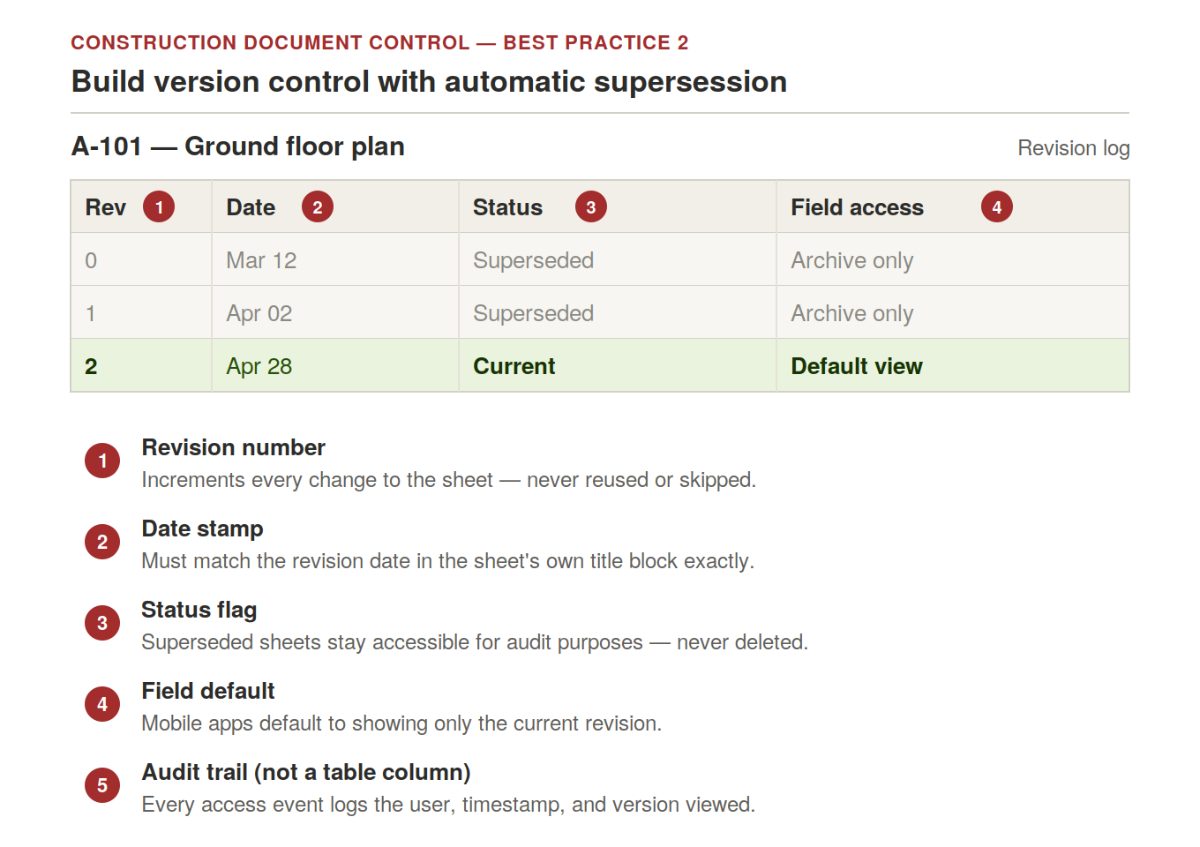
This is the single highest-leverage practice on this list. When a document is revised, the prior version should be automatically marked superseded — not deleted, but clearly flagged as no longer current, while remaining accessible for audit purposes. Field teams accessing a drawing should see the current version by default; anyone needing the prior version for reference or dispute purposes should have to request it explicitly. A platform, or a manual protocol, that lacks genuine automatic supersession does not provide document control, regardless of how it's marketed. The cost of a single crew installing from a superseded drawing routinely exceeds a year of whatever system would have prevented it.
Best Practice 3: Formalize Approval Workflows and Audit Trails
Drawings, submittals, RFIs, and change orders all require a defined approval chain — who reviews, in what order, with what escalation path if a reviewer stalls. Left informal, approval becomes an email thread that nobody can reconstruct six months later when a dispute arises. Every approval, every document access event, and every revision should be logged with the user, the timestamp, and, where litigation risk is elevated, enough context to reconstruct the decision. This is what makes a document control practice defensible in a dispute, an audit, or an insurance claim, rather than merely convenient day to day.
Best Practice 4: Control Bid and Procurement Documents Before They Become Field Problems
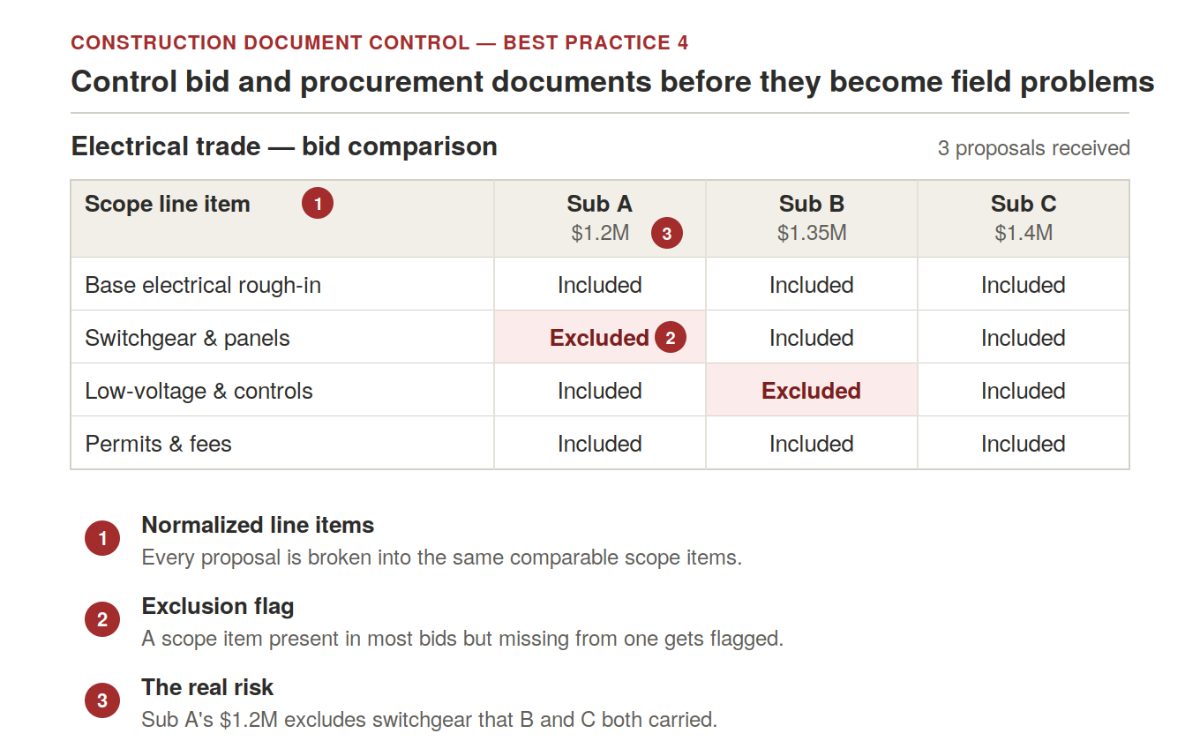
Bid and procurement documents get less attention in most document control conversations than drawings and submittals, but they carry some of the highest financial risk on the project, and they're often the least controlled.
The volume problem. A GC receiving 10–25 subcontractor proposals for a single trade is receiving 10–25 differently formatted PDFs, each with its own exclusions, qualifications, and scope assumptions buried in dense proposal language.
The timing problem. Comparing them accurately happens under a bid-day deadline, which is exactly where scope gaps slip through — not because the estimator missed something obvious, but because manually cross-referencing that many documents in the time available is genuinely hard to do without error.
The framing problem. This is a document control problem before it's an estimating problem. The underlying task — normalizing a set of inconsistent documents into a comparable, auditable format- is the same discipline applied to drawing revisions, just applied to procurement instead.
The cost of skipping it. Where this step is treated as "just Excel," scope gaps get discovered at buyout instead of at award, and the only remaining fixes are a change order, a back-charge, or an uncomfortable conversation about who eats the cost.
Tools purpose-built for this step, likeMelt Bid, read every subcontractor proposal for a trade package, extract scope inclusions and exclusions automatically, and flag gaps across bidders before the award decision is made — producing the same kind of normalized, auditable comparison for procurement documents that a good version-control protocol produces for drawings.
Best Practice 5: Make Field-Mobile Access Non-Negotiable
Drawings, RFIs, and submittals need to be accessible and current, from a phone or tablet in the field, not just from a desktop in the trailer. A superintendent who has to walk back to the office to confirm the latest revision is a superintendent who, under schedule pressure, sometimes doesn't. Mobile access with the same version-control guarantees as the desktop system is table stakes on any active project with a field crew, not an optional convenience layer.
Best Practice 6: Set a Records Retention Policy Before You Need One
Document control doesn't end at project closeout — it determines whether the firm can defend itself years later.
Two different clocks apply. A statute of limitations runs from the time a defect is discovered and can theoretically extend indefinitely. A statute of repose bars claims outright after a fixed period from substantial completion, regardless of when a defect surfaces.
The typical window. Most states set the statute-of-repose period somewhere between four and fifteen years.
The standard retention rule. General guidance from construction risk advisors is to keep project-specific records — drawings, RFIs, meeting minutes, submittals, change orders, and correspondence, for the applicable statute of repose plus a two-to-three-year safety margin. Confirm the exact period with counsel for the project's jurisdiction; this is not a place to guess.
What actually gets used in a dispute. It's rarely the finished drawings — it's the RFIs, meeting minutes, and correspondence that show what was known and decided at the time. A system that discards that context at closeout is discarding the firm's best evidence.
Common Failure Points, in Order of How Often They Actually Happen
No naming or versioning convention at kickoff. Every downstream failure traces back to this one, because retrofitting a convention onto an active project rarely gets full compliance.
Manual version tracking via file names. "Floor Plan v3 FINAL FINAL.pdf" is not version control; it's a guess about which file is current, made by whoever opens it.
Approval by email thread. Undocumented, unsearchable, and impossible to reconstruct when a dispute arises months later.
Bid documents are treated as disposable after award.Scope gaps in subcontractor proposals don't disappear when the subcontract is signed — they surface at buyout, or worse, in the field.
No retention policy, or one applied inconsistently. Either records are destroyed too early, and the firm loses its defense, or nothing is ever destroyed, and retrieval becomes unmanageable.
How to Build a Document Control Plan in Six Steps
Inventory every document category the project will generate, using the table above as a starting point, and assign an owner to each.
Set the naming and folder convention before the first document is uploaded, and put it in writing in the project's general notes or a document control plan.
Define the approval chain for each category — who reviews, in what sequence, and what happens if a reviewer doesn't respond within a set window.
Choose the platform(s) that provide genuine version supersession, audit trails, and field-mobile access for the categories that need them — drawings and submittals almost always need a dedicated platform; simpler categories may not.
Build the retention schedule against the project's jurisdiction-specific statute of repose, with input from legal counsel, before closeout — not after.
Audit compliance mid-project, not just at closeout. A naming convention or approval workflow that's already broken by month three of a twelve-month project isn't going to self-correct.
Frequently Asked Questions
What is the difference between document control and document management?
Document management is the storage, organization, and retrieval. Document control adds version tracking with automatic supersession, formal approval workflows, expiration alerts, and audit trails on top of storage. General storage tools provide management; construction-specific practices and platforms provide control.
What is the single most important document control practice?
Automatic version supersession. When a document is revised, the prior version should be clearly marked outdated, while the current version becomes the default for anyone accessing it — this single practice prevents the most common and most costly document control failure: a field crew working from an outdated drawing.
How long should a GC retain construction project records?
Most states set a statute of repose between four and fifteen years from substantial completion, and standard risk-management guidance is to retain project-specific records for that period plus a two-to-three-year safety margin. Confirm the exact period for the project's jurisdiction with legal counsel, since state statutes vary and some records — like federal prevailing-wage payroll — carry their own separate retention requirements.
Are subcontractor bid proposals part of document control?
Yes. Bid and procurement documents carry real financial risk and are often the least controlled category on a project — arriving as inconsistently formatted PDFs that get compared manually under deadline pressure. Applying the same discipline used for drawings — normalizing, comparing, and flagging gaps in a structured, auditable way — to bid documents catches scope gaps before award instead of after buyout.
Can a small GC do document control without enterprise software?
Yes, at a small scale. A disciplined naming convention, a single shared drive with a clear folder structure, and a manually maintained revision log can function as document control for a small project. The risk is consistency — manual systems degrade quickly as project volume or team size grows, which is usually the signal that it's time for dedicated tooling.
What causes most document control failures on construction projects?
Missing conventions, not missing software. No naming standard, no defined version protocol, and no clear approval chain will defeat even a well-chosen platform. The tool enforces the convention; it doesn't create one.
Does document control apply after the project is complete?
Yes - records retention is a continuation of document control, not a separate function. The documents that matter most in a post-completion dispute (RFIs, meeting minutes, correspondence) are often the ones most likely to be discarded early if a retention policy isn't set before closeout.
Related Building Code Resources
- Building CodesGo/No-Go Readiness Checklist for Construction Project Pursuit Decisions
- Building CodesBest Construction Document Control Software in 2026
- Building CodesBest Construction Estimating Software for Mac in 2026
- Building CodesAddenda in Construction: Definition, Purpose, and How to Manage Them
- Building CodesBest Construction CRM Software for Bid Tracking and Follow-Up for General Contractors
Don't miss what's shaping AEC
The latest on preconstruction, codes, AEC news & trends — so you're always in the know.
MeltPlan
A curated stream of preconstruction intelligence, estimating innovation, takeoff breakthroughs, workflow advancements, and expert perspectives—powered by the AI and technology shaping the future of construction.
Visit Site