Architectural Design Software in 2026: A Workflow-First Comparison With Per-Stage Tool Comparisons
The right way to choose architectural design software is not by ranking the most popular tools and picking the number one. It is by mapping the architect's actu..
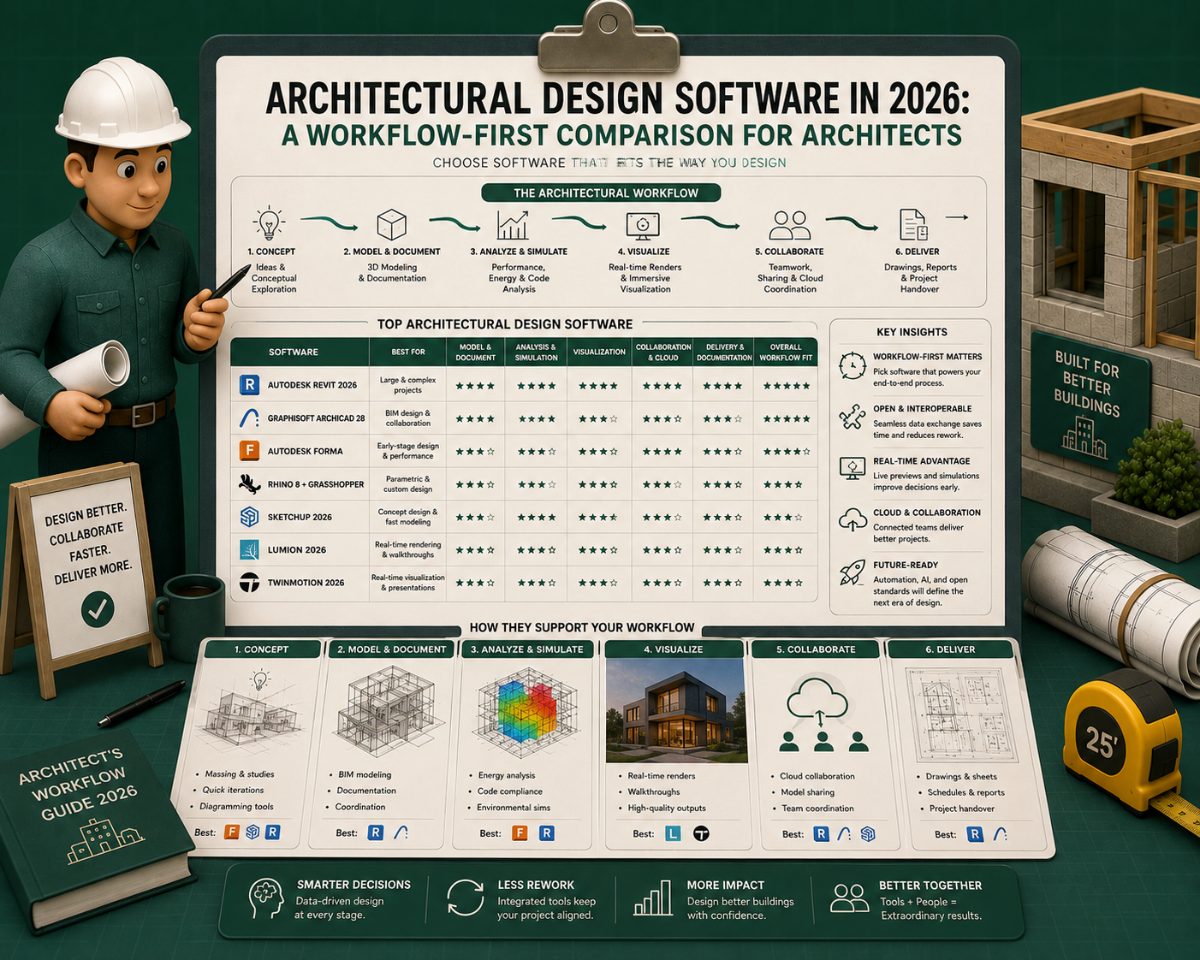
The right way to choose architectural design software is not by ranking the most popular tools and picking the number one. It is by mapping the architect's actual workflow, from sketch to permit to construction, and asking which tool dominates at each stage. The reason: no single tool wins the whole workflow. Revit owns design development. SketchUp owns the concept. AutoCAD still owns construction documents at thousands of small firms. Rhino owns complex geometry. And a new category, AI building code research, owns the part of the workflow that traditional design software does not address at all.
This article maps the architectural software market as of 2026 into six workflow stages, identifies which tools lead at each one, and provides head-to-head feature comparisons for the directly competing products within each stage. The audience is the architect, design firm, or visualization specialist evaluating which tools to invest in, whether replacing legacy software, adding capability, or building a new firm's tech stack from scratch.
The Six Stages of the Architectural Design Workflow
Every architectural project moves through six stages, regardless of project type or firm size. The tools that dominate each stage are different — and treating them as interchangeable is the root cause of most architectural-firm tech-stack frustration.
Stage | What the architect is doing | Leading tools (2026) |
1. Concept Design | Massing studies, site analysis, early option exploration | SketchUp, Rhino 8, Revit Massing |
2. Design Development | Detailed building model with walls, floors, windows, doors | Revit 2026, Archicad 29, Vectorworks 2026 |
3. Construction Documents | Permit-ready sheet set with dimensions, schedules, details | Revit, Archicad, AutoCAD 2026, BricsCAD |
4. Visualization | Renderings, walkthroughs, client presentations | Enscape, Twinmotion 2026.1, D5 Render 3.0, Lumion |
5. Code Compliance | Code research, code analysis block, cross-referencing | Melt Code, ICC Digital Codes |
6. Project Coordination | Multi-discipline coordination, clash detection, document control | BIM 360, Bluebeam Revu, Procore |
The six stages are not strictly sequential; concept and design development overlap, visualization runs through the entire project, but the tools at each stage are distinct enough that most architects use four to six different software products on a typical project.
Essential Features to Evaluate Within Each Stage
Before reading the per-stage comparison tables below, the architect should know what to evaluate. Each stage has its own feature framework — the wrong evaluation criteria produce the wrong choice, no matter how detailed the comparison.
For Concept Design Tools
Speed of iteration — how quickly can the architect explore options without fighting the modeling environment?
Learning curve — how long does a new user take to be productive?
Integration with downstream BIM — does the concept model carry forward into Revit/Archicad without lossy export?
Parametric capability — for firms doing competition work or complex geometry, the presence of visual programming tooling (Grasshopper, Marionette)
License cost and free-tier availability — particularly for students, freelancers, and small firms
For Design Development (BIM) Tools
Native discipline integration — does the platform handle MEP, structural, and architectural in one environment, or via plugins?
Cloud worksharing — multi-user collaboration on the same model across distributed teams
IFC and openBIM compliance — for projects requiring cross-platform model exchange
Plugin ecosystem — third-party extensions for analysis, automation, and content
AI tooling — generative design, AI-assisted modeling, and AI-grounded model assistants (now standard in 2026)
License model — subscription vs. perpetual, cost per seat, network license options
For Construction Documents Tools
Sheet production efficiency — automated from model vs. manual 2D drafting
DWG compatibility — universal industry standard for file exchange
Annotation and dimensioning tooling — precision, automation, and ease of revision
Plotting/printing controls — line weight, scale, sheet set management
Plugin/library depth — detail libraries, manufacturer content, firm standards
For Visualization Tools
Real-time vs. production rendering capability — speed at quality level
BIM live-link integration — does the model update the render automatically?
Asset library — vegetation, furniture, vehicles, surface materials
Hardware requirements — GPU VRAM minimum and recommended
Aesthetic register — photorealistic, illustrative, cinematic
Output formats — still images, walkthroughs, VR, panoramas, interactive presentations
For Code Compliance Tools
Citation transparency — does the tool show the IBC section, edition year, and exact passage?
Accuracy benchmark — validated against what (building inspector exams, code-consultant outputs, etc.)?
Code coverage — which model codes and which state/local amendments?
Reasoning visibility — can the architect see step-by-step how the tool arrived at the answer?
Input boundaries — does the tool read only the codes, or the open internet (hallucination risk)?
For Project Coordination Tools
Multi-discipline model federation — coordinating architectural, structural, MEP into a single environment
Clash detection depth — automatic rules, custom rules, false-positive filtering
Field-mobile workflows — tablets and phones for site teams
Cross-platform support — Revit, Archicad, Tekla, IFC, SketchUp in the same workspace
Workflow integration — RFI tracking, submittal management, document control
The per-stage tables below compare directly competing products on these criteria. Tools across different stages are not compared against each other because they don't solve the same problem.
Stage 1: Concept Design — SketchUp, Rhino 8, and Revit Massing Compared
Concept design is the phase where the architect is exploring options before committing to a model. The work is fast, iterative, and intentionally rough. The tools that win this stage are the ones that let the architect think with their hands without fighting a heavy modeling environment.
Concept Design Tool Comparison
Feature | SketchUp Pro | Rhino 8 + Grasshopper | Revit 2026 (Massing) |
Primary use case | Massing, concept modeling, presentation | Complex geometry, parametric design, competition work | Massing that carries forward into BIM |
Learning curve | Shortest in category (hours) | Steepest (weeks for productive Grasshopper use) | Moderate (already in Revit ecosystem) |
Parametric tooling | Limited (plugins available) | Best in class (Grasshopper) | Conceptual mass families, Dynamo |
BIM integration | Via plugins (D5, Enscape live-link) | Rhino.Inside.Revit (lossless data exchange) | Native (it is Revit) |
File format compatibility | SKP, DWG, IFC, OBJ import/export | 3DM, IGES, STEP, STL, DWG, IFC | RVT, RFA, IFC, DWG |
Cloud collaboration | Trimble Connect | Limited (third-party plugins) | BIM Collaborate Pro |
Free / lower-tier option | SketchUp Free (browser) | Rhino 8 Educational ($195) | Revit LT (~$535/yr) |
Typical cost (subscription) | ~$349/yr (Pro) | $995 perpetual, no subscription | ~$2,800/yr (full Revit) |
Hardware demand | Low (runs on most laptops) | Moderate | High (especially for large models) |
Best for | Most architects in U.S. small/mid firms | Complex geometry, parametric work, competitions | Revit-native firms wanting data continuity |
SketchUp Pro 2026 remains the dominant concept tool at small and mid-size firms. Its appeal is its learning curve and its forgiving geometry tools that let an architect push, pull, and erase without breaking the model. Live-link plugins for D5 Render and Enscape make it a one-stop concept-plus-visualization environment.
Rhino 8 with Grasshopper leads concept design at firms doing complex geometry, parametric design, and competition work. Rhino.Inside.Revit (released stably in recent versions) lets Rhino models inform Revit work directly without lossy export, making it meaningful for firms moving from Rhino concept to Revit production.
Revit's Massing environment is used for concept work primarily when the project will be developed entirely in Revit. The benefit is data continuity. The cost is the learning curve overhead if the firm isn't already Revit-native.
The decision rule at this stage: speed of iteration matters more than data fidelity. Whichever tool the architect can think fastest in is the right tool.
Stage 2: Design Development — Revit 2026 vs. Archicad 29 vs. Vectorworks Architect 2026
Design development is where the concept becomes a building. This is the stage where BIM tools dominate because the deliverable is not just a model — it is a coordinated, data-rich representation of a real building.
Design Development (BIM) Tool Comparison
Feature | Revit 2026 | Archicad 29 | Vectorworks Architect 2026 |
Vendor | Autodesk | Graphisoft (Nemetschek) | Vectorworks (Nemetschek) |
2026 release | April 2025 | October 7, 2025 | September 10, 2025 |
Native platforms | Windows | Windows, macOS | Windows, macOS |
Architecture-focused workflow | Strong | Strongest (design-first interface) | Strong |
MEP integration | Native (Revit MEP, one environment) | Via MEP Modeler add-on or IFC | Limited (plugins, IFC) |
Structural integration | Native (Revit Structure, one environment) | Via add-on or IFC | Limited |
Cloud worksharing | BIM Collaborate Pro / Cloud Worksharing | BIMcloud, Teamwork | Vectorworks Cloud Services |
IFC / openBIM | Yes (certified) | Yes (certified, openBIM strong) | Yes (certified) |
AI tooling (2026) | Autodesk Assistant (tech preview) | AI Visualizer, AI Assistant (beta) | Sustainability Dashboard (rule-based) |
Visualization integration | Live link to Enscape, Twinmotion, D5 | BIMx (immersive), AI Visualizer | Built-in rendering + plugins |
Plugin ecosystem | Largest in industry | Strong, smaller than Revit | Moderate |
Reality capture (mesh/point cloud) | Native (Revit 2026 added improved mesh integration) | Via add-on | Via add-on |
U.S. market share (commercial) | Dominant | Smaller, growing | Moderate (entertainment, landscape integration strong) |
Typical cost (subscription) | ~$2,800/yr per seat | ~$2,500/yr per seat | ~$2,500/yr per seat |
Best for | U.S. commercial/institutional, large firms, MEP-coordinated projects | Boutique residential, macOS-native firms, openBIM workflows, non-U.S. markets | Multi-discipline (landscape, entertainment), small-to-mid firms wanting BIM breadth |
Autodesk Revit 2026 (released April 2025, marking 25 years of the platform) is the BIM market leader for commercial, institutional, and large-firm work. The 2026 release introduced accelerated GPU-based graphics for smoother navigation, reality-capture mesh integration for renovation and adaptive-reuse projects, and Autodesk Assistant in tech preview — an AI grounded in the project model. Revit's strength is its ecosystem: thousands of plugins, deep MEP and structural integration, and Autodesk Construction Cloud for multi-discipline coordination.
Graphisoft Archicad 29 (released October 7, 2025) is the BIM alternative with the strongest architect-focused workflow. Its appeal is its design-first interface, native macOS support, and integration with the Apple Vision Pro through BIMx for immersive client presentations. The 2026 product lineup includes the AI Visualizer for cloud-based concept rendering and an AI Assistant (beta) for in-app workflow guidance. Archicad has a stronger share at boutique architectural firms, sole practitioners on Mac, and firms outside the U.S.
Vectorworks Architect 2026 (released September 10, 2025) holds the middle of the BIM market — particularly strong at landscape-integrated projects, theatre and entertainment design, and small-to-mid firms that need BIM capability without the Autodesk price commitment. The 2026 release introduced the Sustainability Dashboard for live sustainability metrics, Door/Window/Wall 2D Detailing for granular drawing control, and Depth Cueing for visual clarity in sections and elevations. Vectorworks' strength is its breadth: the same software handles architectural, landscape, lighting, and event-design work, and it remains the only BIM solution that can export backward to previous Revit versions.
The Revit vs. Archicad vs. Vectorworks decision is rarely made on features alone. The decision is made on firm context: which platform the team is trained on, which platform the firm's consultants use, which platform the project owner expects deliverables in, which platforms macOS support matters for, and which license cost the firm can sustain.
Stage 3: Construction Documents — Revit, Archicad, AutoCAD 2026, BricsCAD Compared
Construction documents are the permit-ready sheet set that goes to the AHJ for plan review and to the contractor for construction. The tool that produces these sheets has to do two things: generate dimensioned, scheduled, annotated drawings that comply with plan-review conventions, and do so without breaking when the design changes.
Construction Documents Tool Comparison
Feature | Revit 2026 | Archicad 29 | AutoCAD 2026 | BricsCAD |
Tool category | BIM (model-based docs) | BIM (model-based docs) | 2D CAD | 2D/3D CAD (AutoCAD alternative) |
Sheet production | Live views of model | Live views of model | Manual 2D drafting | Manual 2D drafting |
Dimensioning | Associative to model | Associative to model | Manual, parametric available | Manual, parametric available |
Schedule generation | Automatic from model data | Automatic from model data | Manual or via plugins | Manual or via plugins |
DWG compatibility | Import / export (lossy on advanced features) | Import / export | Native | Native (engineered DWG compatibility) |
Change propagation | Automatic across all sheets when model changes | Automatic across all sheets when model changes | Manual update across sheets | Manual update across sheets |
U.S. National CAD Standard compatibility | Yes (templates) | Yes (templates) | Yes (industry default) | Yes |
Plugin ecosystem (detail libraries) | Vast | Strong | Largest in industry | Moderate |
Licensing model | Subscription only (Autodesk) | Subscription or perpetual | Subscription only (Autodesk) | Perpetual or subscription |
Typical cost (subscription) | ~$2,800/yr | ~$2,500/yr | ~$2,030/yr | ~$1,065 perpetual or ~$1,000/yr |
Hardware demand | High (especially with model complexity) | High | Moderate | Moderate |
Best for | Commercial new construction, multi-family, institutional | Mac-native firms, boutique residential, openBIM projects | Small residential, ADUs, simple renovations, DWG-heavy environments | AutoCAD-alternative seeking DWG compatibility without Autodesk subscription |
For commercial work — tenant improvements, new commercial construction, multi-family residential, and institutional projects, the BIM tools (Revit, Archicad, Vectorworks) dominate at this stage because the model produces the documents. Change the model, change the documents.
For smaller residential work — single-family houses, ADUs, simple renovations — AutoCAD 2026 still holds a significant market share. The reason is workflow economics: BIM overhead is not justified on a project where the architect produces the entire set in two to three weeks. AutoCAD's strength at this stage is its precision, its universal file compatibility, and the depth of its detail libraries.
BricsCAD has captured a meaningful share of the AutoCAD-alternative market for firms that want DWG compatibility without the Autodesk subscription cost. The trade-off is a smaller plugin ecosystem and a less universal third-party detail library.
The construction documents stage is also where the work most directly intersects with code compliance (see Stage 5). The cover sheet code analysis block, the life safety plan, and the accessibility details — all of these are construction-document sheets that depend on code research the architect has done before drawing. This is where the workflow stages most visibly connect.
Stage 4: Visualization — Enscape, Twinmotion 2026.1, D5 Render 3.0, Lumion Compared
Visualization tools turn the design model into images, animations, and immersive walkthroughs that the architect uses to communicate design intent to clients, planning boards, and project owners. The category fragmented in the last five years as four real-time rendering tools captured market share from the legacy ray-tracing renderers.
Visualization Tool Comparison
Feature | Enscape | Twinmotion 2026.1 | D5 Render 3.0 | Lumion |
Vendor | Chaos Group | Epic Games (Unreal Engine 5) | Shenzhen Dimension | Act-3D |
Real-time rendering | Yes | Yes | Yes (path tracing) | Yes |
Production-quality option | Via V-Ray handoff | Yes (Path Tracer mode) | Yes (Path tracing mode) | Limited |
BIM live-link | Revit, Archicad (deepest), SketchUp, Rhino | Revit, Archicad, SketchUp, Rhino, Vectorworks, 3ds Max (via Datasmith) | Revit, Archicad, SketchUp, Rhino, 3ds Max, C4D, Blender (LiveSync) | Revit, Archicad, SketchUp, Rhino |
Asset library size | Moderate (growing via Chaos Cosmos) | Largest (10,000+ assets + Quixel Megascans) | Moderate (growing rapidly) | Strong (vegetation, foliage) |
AI tooling | V-Ray Cosmos materials | AI animation tools | AI scene atmosphere, AI materials, AI terrain | Limited |
Aesthetic register | Clean, accurate, less stylized | Cinematic, Unreal Engine polish | Photorealistic, configurable | Illustrative, painterly |
VR / immersive output | Yes | Yes (strong) | Yes | Yes |
Hardware demand (recommended VRAM) | 8 GB (mid-range GPUs workable) | 12+ GB (Unreal Engine 5) | 16+ GB for path tracing | 12+ GB |
Free / lower-tier option | None (subscription only) | Free for firms < $1M annual revenue, students, educators | Free tier (D5 Lite for SketchUp also free) | None (perpetual or subscription) |
Typical cost | ~$685/yr (with V-Ray bundle higher) | Free or Studio license | Free / Pro $360/yr / Premium $900/yr | ~$1,799 perpetual or ~$799/yr |
Best for | Revit/Archicad-native firms wanting deepest integration | Cinematic walkthroughs, landscape-heavy renders, students/small firms | Speed-and-ease first, SketchUp-native concept work | Landscape architecture, illustrative aesthetic |
Enscape integrates more deeply with Revit and Archicad than any other real-time renderer. Once installed, it sits inside the BIM tool as a plugin — the architect designs in Revit, and Enscape's live view updates as the model changes. Enscape was acquired by Chaos Group (the V-Ray developer) in 2022, and the two products now integrate.
Twinmotion 2026.1 (released April 2026) is Epic Games' real-time renderer built on Unreal Engine 5. The 2026.1 release added photo-matching tools for compositing 3D models into photographic backplates, a light-linking system, edge-softening render effects, and expanded camera and lens properties. Strongest asset library in the category. Free tier for students, educators, and firms earning under $1M annual revenue makes it dominant at smaller firms.
D5 Render 3.0 has captured significant market share with real-time path tracing, AI-assisted scene tools, and an interface designed to reduce setup time. Parent company Shenzhen Dimension secured $80M Series C funding in January 2025 (~$95.8M total), signaling the platform is well-resourced for continued development. D5 Lite extends the platform into SketchUp for concept-stage rendering.
Lumion remains the dominant choice at landscape-focused and illustrative aesthetic firms. Its strength is its character, which renders from Lumion have a recognizable visual style that some architects specifically prefer over the hyper-photorealism of newer tools.
The choice between the four is rarely about capability; all four can produce client-ready output on a typical project. The decision is driven by render speed, learning curve, team familiarity, and license cost.
Stage 5: Code Compliance — A Stage Traditional Design Software Doesn't Address
Code compliance is the workflow stage where the architect researches the applicable building codes, builds the cover sheet's code analysis block, and verifies that the design complies with the IBC, ADA, ANSI A117.1, energy code, and applicable state and local amendments. On a typical project, this work takes 50 to 300 hours of the architect's time — and it is the stage where the traditional design software (Revit, Archicad, AutoCAD) does not help.
Code Compliance Tool Comparison
Feature | ICC Digital Codes | Manual Code Matrix (Excel) | Generalist AI (ChatGPT, etc.) | Melt Code |
Category | Code reference platform | Firm-built template | Generalist AI assistant | AI-native code research |
Source of truth | Authoritative (publishes IBC) | Architect's own interpretation | Open-internet training data | Building codes only (no internet) |
Project-specific synthesis | No (architect synthesizes manually) | Partial (template-bound) | Yes (but unreliable) | Yes |
Citation transparency | Yes (the code itself) | Manual entry | Often fabricates section numbers | Yes (direct code citations) |
Reasoning visibility | N/A | Manual | Often opaque or hallucinated | Yes (step-by-step shown) |
Code coverage | IBC, IRC, IEBC, IFC, IMC, IPC, IECC, NEC, NFPA (purchase per code) | Whatever the firm has built | Whatever's in training data | IBC, IRC, IEBC, IFC, IMC, IPC, IECC, NEC, NFPA, ADA, ANSI A117.1 + local amendments |
State/local amendments | Available per-state subscription | Manually maintained | Unreliable | Built in |
Accuracy benchmark | N/A (it's the source) | Depends on firm | Not benchmarked for code research | 95%+ validated against building inspector exams |
Hallucination risk | None | None | High | Low (reads only codes) |
Typical cost | ~$500–2,500/yr per code/region | One-time build + maintenance | Free to ~$240/yr (ChatGPT Plus) | Contact for pricing |
Best for | Every architect (source of truth) | Firm-specific recurring workflows | Not recommended for production code research | Project-specific compliance synthesis with verification |
The traditional code-research workflow has two parts. First, the architect usesICC Digital Codes to look up specific requirements. ICC Digital Codes is the source of truth at this stage; every architect needs an ICC subscription. Second, the architect synthesizes the project-specific compliance picture by hand: for this construction type, this occupancy, this sprinkler design, this frontage, what is the allowable area? What separations are required? This synthesis is the 50–300 hour part.
The newest category at this stage is AI building code research, which emerged in 2024–2025 as large language models crossed the accuracy threshold needed to interpret legal-style code text with cross-references, exception clauses, and table-driven conditional logic. Melt Codeis the AI-native tool in this category. It does not compete with Revit — Revit doesn't do code research. It complements Revit by solving the code-research and compliance-path-synthesis work that Revit was never built for.
Critical evaluation note: Generalist AI tools (ChatGPT, Claude direct, Gemini direct) frequently fabricate code section numbers when answering code questions. They may produce plausible-sounding citations like "IBC Section 1023.4" that don't exist or that exist but say something different. Tools built specifically for code research — that constrain their input to the actual code text — eliminate this risk. Generalist AI is not safe for production code research.
The architect's preconstruction tech stack, in this framing, is not Revit or Melt Code. It is Revit and Melt Code, each solving a different stage of the same workflow.
Stage 6: Project Coordination — Bluebeam, BIM 360 / ACC, Procore Compared
Project coordination is the last stage of the preconstruction workflow — managing the drawing set across the project team, coordinating between architectural, structural, MEP, and civil consultants, running clash detection between disciplines, and tracking revisions through plan review and construction.
Project Coordination Tool Comparison
Feature | Bluebeam Revu | Autodesk Construction Cloud (BIM 360 / Build) | Procore | Revizto |
Tool category | PDF markup and review | Cloud BIM coordination platform | Construction management platform | Cross-platform model coordination |
PDF markup | Industry standard | Available | Available | Limited |
BIM model federation | No | Yes (Revit-native strongest) | Yes (basic) | Yes (platform-agnostic) |
Automatic clash detection | No | Yes (Model Coordination module) | Limited | Yes |
Cross-platform support | PDF only | Revit-strongest, IFC supported | Multiple platforms via integrations | Revit, Archicad, Tekla, IFC, Navisworks |
Field-mobile workflows | Yes | Yes (ACC Build) | Yes (strong) | Yes |
RFI / submittal tracking | Limited | Yes | Yes (strong) | Limited |
Document version control | Yes | Yes | Yes | Yes |
Typical cost | ~$240/yr per seat | ~$80–155/yr per seat (module-dependent) | Volume-based (project value) | ~$600–1,200/yr per seat |
Best for | Universal markup (every architect should have) | Revit-native firms, cloud-based coordination | Construction management at GCs and design-build firms | Multi-platform federation, megaprojects |
Bluebeam Revu is the dominant tool for PDF-based markup and team review. Architects use it for plan-check correction responses, owner-review markups, and field-issue tracking. Studio Sessions enable real-time multi-party review.
Autodesk Construction Cloud (ACC)is the dominant cloud-based coordination platform for Revit-native projects. Clash detection, model coordination, document control, and field reporting all live in one Autodesk environment.
Procore is the construction-management platform that bridges preconstruction and construction. Many firms use Procore as the system of record for drawings during construction.
Revizto is the strongest cross-platform alternative. Where ACC ties closely to Revit, Revizto federates Revit, Archicad, Tekla, IFC, Navisworks, and dozens of other formats, useful for projects where multiple BIM platforms are in play.
The decision at this stage is largely driven by who else is on the project. If the GC is on Procore, the architect typically follows. If the firm is Revit-native and the project is large, ACC is the default. Bluebeam is universal; virtually every architect, GC, and engineer uses it for PDF-based work regardless of what other tools the team has standardized on.
How Should an Architectural Firm Build Its Tech Stack?
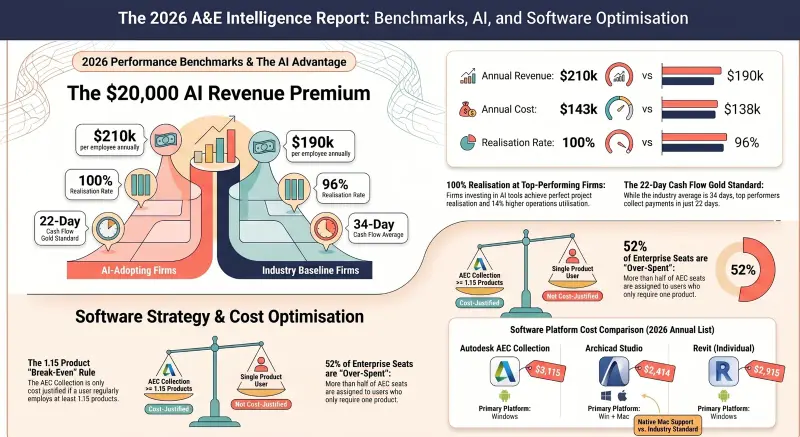
The honest answer: by project type and firm size, not by feature ranking.
A solo residential architect building single-family houses and ADUs: SketchUp for concept, AutoCAD or Revit LT for construction documents, Enscape or D5 Render for visualization, Bluebeam for PDF review, and ICC Digital Codes for code research. Total annual software cost: roughly $4,000–7,000 per seat.
A 10–25 person commercial firm doing tenant improvements and small new construction: Revit (or Archicad) for the entire BIM workflow, SketchUp for concept, Enscape or Twinmotion for visualization, Bluebeam for review, ACC for coordination, ICC Digital Codes for code research, and Melt Code for code compliance synthesis. Total annual software cost: $8,000–15,000 per seat.
A 100+ person multi-discipline firm doing institutional and large commercial work would add: Rhino + Grasshopper for complex geometry, full Autodesk Construction Cloud, V-Ray or D5 in addition to Enscape, Procore for construction-phase coordination, and code-consultant relationships layered on top of Melt Code for the most complex projects. Total annual software cost: $15,000–25,000+ per seat.
The pattern: tech stack size scales with project complexity, not with firm size. A 5-person firm doing complex institutional work can spend more per seat than a 50-person firm doing repetitive multifamily.
Frequently Asked Questions
What is the best architectural design software in 2026?
There is no single best tool — there are six workflow stages, and different tools lead at each. For BIM-based design development, Revit 2026 and Archicad 29 lead, with Vectorworks Architect 2026 strong in multi-discipline contexts. For 2D construction documents at smaller firms, AutoCAD 2026 still holds a significant share, with BricsCAD as the cost-conscious alternative. For concept design, SketchUp Pro and Rhino 8 lead. For visualization, Enscape, Twinmotion 2026.1, D5 Render 3.0, and Lumion compete. For code compliance, a workflow stage that traditional design software does not address, Melt Code is the AI-native tool. Most professional firms use four to six different software products across these stages.
Should architects use Revit or Archicad?
Both cover the design development stage comprehensively. The decision is rarely made on features alone. It is made on a firm context: which platform the team is trained on, which platform the firm's consultants use, which platform the project owner expects deliverables in, which platforms macOS support matters for, and which license cost the firm can sustain. Revit dominates U.S. commercial and institutional work; Archicad has a stronger share in boutique residential, macOS-native firms, and outside the U.S.
Is AutoCAD still relevant for architects in 2026?
Yes, particularly for smaller residential work, tenant improvements, and firms that do not justify BIM overhead. AutoCAD 2026 remains capable, universal in file compatibility, and faster to learn than BIM tools. For commercial new construction and multi-family residential, BIM tools (Revit, Archicad, Vectorworks) lead because the model produces the documents.
What is the most underrated stage of the architectural software workflow?
Code compliance. Architects spend 50–300 hours per project on code research, but the traditional design software (Revit, Archicad, AutoCAD) does not help with this work. The traditional workflow uses ICC Digital Codes as the source of truth and the architect's own hours for synthesis. AI building code research, Melt Code is the leading tool in this new category — it addresses the synthesis work directly. It does not replace ICC Digital Codes; it sits on top of them.
How much should a small architectural firm budget for software in 2026?
For a solo residential architect: roughly $4,000–7,000 per seat per year. For a 10–25 person commercial firm: $8,000–15,000 per seat. For a 100+ person multi-discipline firm: $15,000–25,000+ per seat. The cost scales with project complexity more than firm size; a small firm doing complex institutional work can spend more per seat than a large firm doing repetitive multifamily.
Do architects need both BIM software and AI code research software?
For commercial work, yes, they solve different problems. BIM software (Revit, Archicad) produces the building model and the construction documents. AI code research (Melt Code) handles the code research and compliance-path synthesis that the BIM software does not address. The two complement rather than compete. For simple residential work, the architect may not need AI code research if they work in familiar jurisdictions on familiar project types — but the time savings compound on novel project types and unfamiliar jurisdictions.
Why can't this article rank all the tools in one master comparison table?
Because the tools across different stages solve different problems. Revit and SketchUp are not competitors — Revit is a BIM platform for design development, and SketchUp is a concept modeler. Ranking them on the same feature list produces either misleading apples-to-oranges scoring or trivial "Yes / N/A" cells. The per-stage tables in this article compare directly competing tools within the same workflow stage, which is the only honest way to compare architectural design software.
Related Building Code Resources
- Overview GuideBIM Construction Software: The Complete Guide for Architects and Engineers
- Overview GuideBuilding Permit Drawings Software: The Complete Guide for Architects and Designers
- Building CodesThe Best 3D Rendering Software for Architects in 2026: A Workflow-First Comparison
- Building CodesBest AI to Generate Floor Plans: A Professional Comparison for Architects and Designers
- Building CodesBIM Construction Software in 2026: A GC's Guide to Coordination, Clash Detection, and Quantity Takeoff
MeltPlan
A curated stream of preconstruction intelligence, estimating innovation, takeoff breakthroughs, workflow advancements, and expert perspectives—powered by the AI and technology shaping the future of construction.
Visit SiteDon't miss what's shaping AEC
Don't miss what's shaping AEC The latest on preconstruction, codes, AEC news & trends — so you're al