The Best 3D Rendering Software for Architects in 2026: A Workflow-First Comparison
Architectural rendering was split into two distinct categories years ago, and the split is now permanent. On one side: real-time renderers (Enscape, Twinmotion,..
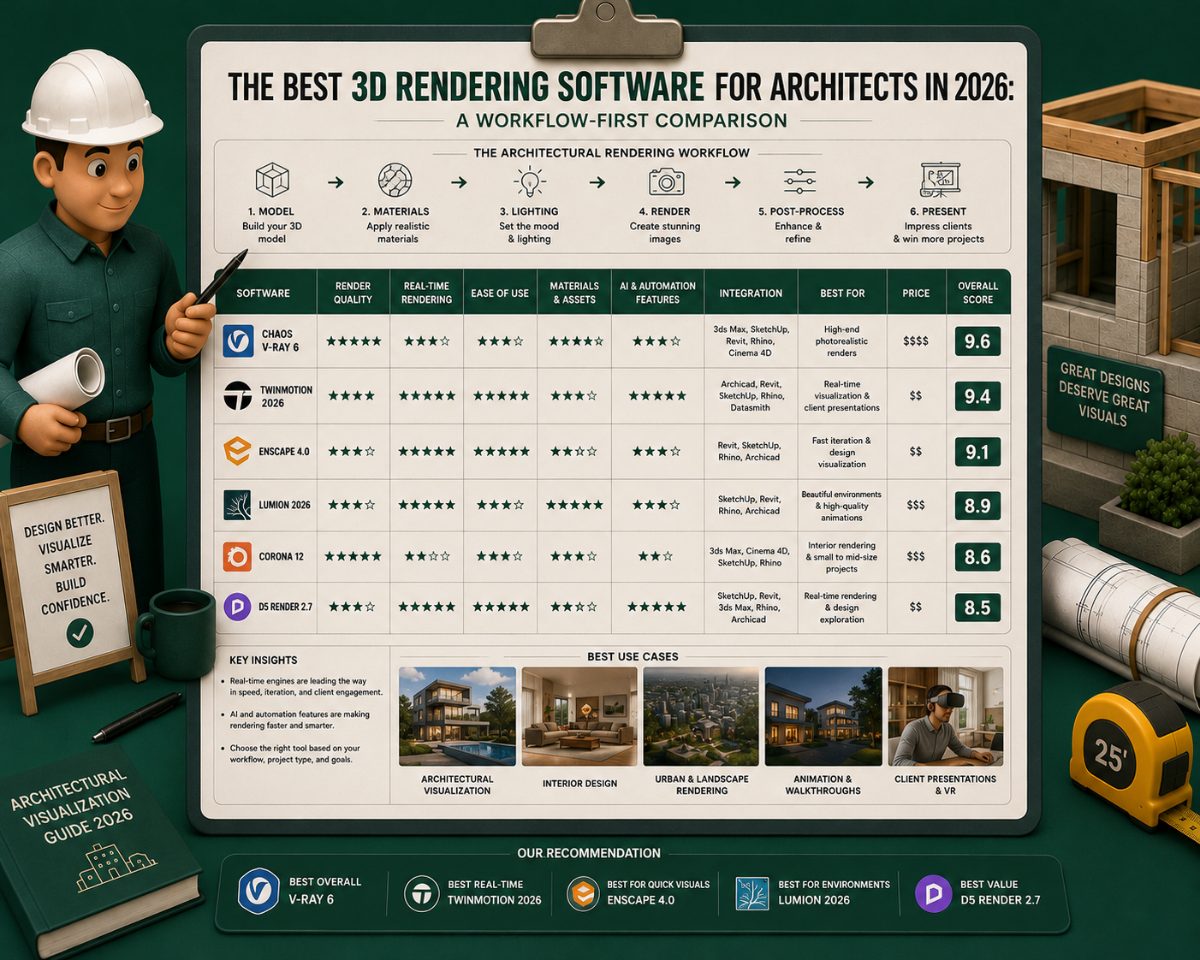
Architectural rendering was split into two distinct categories years ago, and the split is now permanent. On one side: real-time renderers (Enscape, Twinmotion, D5 Render, Lumion) that produce client-ready images in seconds and live-update as the architect modifies the design model. On the other side: production renderers (V-Ray, Corona, Octane) that produce film-quality images in minutes to hours and remain the standard for marketing imagery, competition boards, and high-stakes presentations. Most architectural firms now use both, a real-time tool for the day-to-day work and a production renderer for the final deliverables that need to last.
This article maps the architectural rendering market as of 2026, identifies which tool leads in which use case, and explains how to think about the buying decision. The audience is the architect, design firm, or visualization specialist evaluating which rendering tool (or tools) to invest in.
Real-Time vs. Production Rendering: What's the Actual Difference?
Real-time rendering and production rendering are not different versions of the same thing. They are different categories solving different problems.
Real-time rendering produces images in seconds by leveraging modern GPU technology, real-time ray tracing, and pre-baked rendering optimizations originally developed for video games. The output appears as the architect works, changes the model, and the render updates within a few seconds to a minute. This is the rendering technology that has transformed architectural visualization in the last five years, because it eliminates the wait between design iteration and visual feedback.
Production rendering (also called "offline rendering") produces images by simulating light physics at high fidelity, taking minutes to hours per frame. The output is closer to photographic quality, with more accurate global illumination, more nuanced material behavior, and more control over every aspect of the image. Production rendering remains the standard for imagery that will be published, printed at large scale, or used in high-stakes competitions and marketing.
The architect's choice is not "which category is better" — it is "which category fits which stage of my workflow." Real-time tools win design development and client review. Production tools win final marketing imagery and competition boards. Most professional firms use both.
Master Comparison Table: All Seven Tools at a Glance
Enscape | Twinmotion 2026 | D5 Render 3.0 | Lumion Pro | V-Ray | Corona | Octane | |
Category | Real-time | Real-time | Real-time | Real-time | Production | Production | Production |
Render engine | Hybrid raster + RT | Unreal Engine 5 | DXR path tracing | Biased raster + RT | Unbiased hybrid | Unbiased hybrid | Unbiased GPU |
Starting price | ~$85/month (Solo) | Free / $445/yr | Free / ~$39.99/mo (Pro) | $229/yr (View) / $1,149/yr (Pro) | $42.90/yr (Solo) | ~$33.50/mo | ~$20/mo (Prime) |
Perpetual license | No | No | No | No | No | No | No |
Free tier | No (trial only) | Yes (under $1M revenue) | Yes (limited) | Student only | Student/trial | Trial only | Trial only |
Min GPU VRAM | 4 GB | 8 GB (RT: 12 GB+) | 8 GB (PT: 8 GB+) | 6 GB | 4 GB (CPU-capable) | 4 GB (CPU-capable) | 8 GB NVIDIA only |
Rec. GPU VRAM | 8 GB | 12–16 GB | 16 GB | 12–16 GB | 8–16 GB (GPU mode) | 8–16 GB (GPU mode) | 16–24 GB |
Mac support | Yes (M1+, limited) | Yes (native) | No (Windows only) | View: Yes / Pro: No | CPU only on Mac | CPU only on Mac | No |
OS | Win / Mac | Win / Mac | Windows only | Windows (Pro) | Win / Mac / Linux | Win / Mac | Windows / Linux |
Learning curve | Low | Moderate | Low–moderate | Low | High | Moderate | High |
AI tools | Limited | None (roadmap) | 9 tools (extensive) | AI upscaler only | Denoiser only | Denoiser only | Neural cache |
Asset library | Chaos Cosmos | 10,000+ (Megascans) | Growing (mid-size) | ~10,000 objects | Chaos Cosmos | Cosmos / Pixel Lab | Limited built-in |
VR output | Yes | Yes (Meta Quest, Varjo) | Yes (limited) | No | No | No | No |
360° panorama | Yes | Yes (Panorama Sets) | Yes | Yes | Yes | Yes | Yes |
Best for | Revit/Archicad BIM firms | Exterior, landscape, VR | Speed + AI iteration | Landscape, exterior | Final marketing imagery | Interior photorealism | Spectral material accuracy |
The Leading Real-Time Renderers in 2026
Enscape: The BIM-Integrated Default
Enscape integrates more deeply with Revit and Archicad than any other real-time renderer. Once installed, it sits inside the BIM tool as a plugin — the architect designs in Revit, and Enscape's live view updates as the model changes. There is no export step, no scene setup, no separate file to manage. This deep integration is why Enscape became the default real-time renderer at firms standardized on Revit and Archicad.
Enscape was acquired by Chaos Group (the V-Ray developer) in 2022, and the two products now integrate — Enscape for real-time work, V-Ray for production output when needed, with shared materials and asset libraries. Enscape's current version (2026) added improved real-time path tracing for higher-fidelity output, expanded the asset library, and tightened the V-Ray handoff.
Best for: Revit and Archicad-native firms that want real-time visualization with minimal scene setup. The path of least resistance for BIM-first workflows.
Tradeoff: Less control over advanced lighting and material parameters than standalone tools like Twinmotion and D5. The price of integration is some loss of flexibility.
Twinmotion 2026: The Unreal-Engine Powerhouse
Twinmotion is Epic Games' real-time visualization tool, built on Unreal Engine 5. The 2026 release (Twinmotion 2026.1, released April 2026) added photo-matching tools for compositing 3D models into photographic backplates, a light-linking system, edge-softening render effects, and expanded camera and lens properties. The 2026 version also fully integrated Nanite virtualized geometry, meaning Twinmotion can handle multimillion-polygon imports without crashing.
Twinmotion's strength is its asset library and atmosphere tooling. The software ships with over 10,000 stock assets and includes built-in access to Quixel Megascans (Epic Games' library of photogrammetry-captured real-world surfaces), giving architects an enormous library of trees, vegetation, vehicles, furniture, and surface materials without external sourcing. Weather, time of day, season, and animated people are all slider controls.
Twinmotion offers a one-click sync with Revit, Archicad, SketchUp, Rhino, Vectorworks, and 3ds Max via Datasmith Direct Link. It is also free for students, educators, and firms earning under $1M in annual revenue, which has made it dominant at smaller firms, design students, and competition entries.
Best for: Firms producing landscape-heavy renders, exterior visualization, urban context studies, and cinematic walkthroughs. Strongest asset library in the category.
Tradeoff: Steeper learning curve than Enscape or D5; Unreal Engine performance demands serious GPU hardware (recommended 12+ GB VRAM); scene setup takes longer than the BIM-integrated tools.
D5 Render 3.0 — The Speed-and-Ease Challenger
D5 Render has captured significant market share in the last two years with a focus on real-time path tracing performance, AI-assisted scene tools, and an interface designed to reduce setup time. The 2026 version (D5 Render 3.0) includes displacement materials, volumetric clouds, dynamic context tools (Cesium for geospatial data, procedural building generation), and AI tools for scene atmosphere matching and material generation.
D5's parent company, Shenzhen Dimension, secured $80M in Series C funding in January 2025, bringing total funding to roughly $95.8M — signaling the platform is well-resourced for continued development. The company also released D5 Lite, a SketchUp-integrated lightweight version that brings AI-native real-time visualization into the concept-design stage without requiring a full D5 Render setup.
D5 integrates via free LiveSync plugins with SketchUp, Revit, Archicad, Rhino, 3ds Max, C4D, and Blender. The free tier is generous; the Pro and Premium tiers add advanced features like path tracing, AI tools, and team collaboration.
Best for: Firms that prioritize speed-to-output and want a more forgiving learning curve than Twinmotion. Strong choice for SketchUp-first concept workflows via D5 Lite.
Tradeoff: Smaller asset library than Twinmotion; some limitations on custom vegetation and very large landscape scenes; relatively newer in the U.S. market than Enscape or Lumion.
Lumion — The Illustrative Veteran
Lumion has been the architectural real-time rendering tool of choice at landscape-focused and illustrative-aesthetic firms for over a decade. The 2024 release continued the platform's focus on landscape detail, foliage realism, and atmospheric effects. Lumion's strength is its character — renders from Lumion have a recognizable visual style that some architects specifically prefer over the hyper-photorealism of newer tools.
Best for: Landscape architecture, exterior-heavy visualization, and firms that prefer an illustrative aesthetic over pure photorealism. Strong asset library for foliage and vegetation.
Tradeoff: Heavier on hardware than newer alternatives; some workflows that competitors handle natively still require Lumion-specific setup. Some users report Lumion has become resource-intensive enough that firms have switched to D5 to reduce hardware refresh cycles.
The Leading Production Renderers in 2026
V-Ray — The Industry Standard
V-Ray remains the production rendering standard at high-end architectural visualization studios and at firms producing competition boards and marketing imagery. V-Ray's strength is its physical accuracy, the depth of its material library (including the same physically-based PBR materials shared with Chaos Cosmos), and its integration across 3ds Max, SketchUp, Revit, Rhino, Cinema 4D, and other DCC tools.
V-Ray's GPU mode has matured significantly, narrowing the speed gap with real-time tools while preserving the visual fidelity production rendering is bought for. The Chaos Cloud rendering service offers offload rendering for jobs that exceed local hardware capacity.
Best for: Final marketing imagery, competition boards, print deliverables, and any project where the image needs to look final. Also, the natural production complement to Enscape.
Tradeoff: Steepest learning curve in the category. Render times measured in minutes to hours per frame, even with GPU acceleration.
Corona Renderer — The Photorealism Specialist
Corona is also owned by Chaos Group and shares much of V-Ray's underlying technology, with an interface optimized for ease of use rather than maximum control. Corona is popular in interior visualization, real estate marketing, and high-end residential work where the rendering goal is photographic realism with minimum setup overhead.
Best for: Interior visualization, residential marketing imagery, and firms wanting V-Ray-class output without V-Ray's complexity.
Tradeoff: Less common in commercial architectural workflows than V-Ray. Mac support has historically been limited.
Octane Render — The Spectrally-Correct Renderer
Octane is the rendering tool of choice for visualization specialists who need the highest fidelity material accuracy — physically correct light dispersion through glass, spectral color accuracy, and unbiased global illumination. The 2026 version added Meshlets (streaming geometry similar to Nanite), Neural Radiance Caching for AI-assisted noise reduction, and continued strong integration with Cinema 4D and Blender.
Best for: High-end interior design portfolios, product visualization where material accuracy is critical, and stylized or cinematic architectural visuals.
Tradeoff: Requires NVIDIA GPU (CUDA-based); not as commonly integrated with the BIM tools as V-Ray or Corona.
Production Renderer Feature Comparison: Deep Dive
CAD and DCC Integration
Integration | V-Ray | Corona | Octane |
3ds Max | ✓✓ (primary) | ✓✓ (primary) | ✓✓ (via plugin) |
SketchUp | ✓✓ (V-Ray for SketchUp) | ✗ | ✓ (via plugin) |
Revit | ✓✓ (V-Ray for Revit) | ✗ | ✗ |
Rhino | ✓✓ (V-Ray for Rhino) | ✗ | ✓ (via plugin) |
Cinema 4D | ✓ (V-Ray for C4D) | ✓ (via plugin) | ✓✓ (native, primary) |
Blender | ✓ (V-Ray for Blender) | ✗ | ✓✓ (BlenderKit integration) |
Maya | ✓ | ✗ | ✓ |
Houdini | ✓ | ✗ | ✓ |
Standalone app | ✗ | ✗ | ✗ |
Rendering Engine Capabilities
Capability | V-Ray | Corona | Octane |
Rendering type | Hybrid (CPU + GPU) | Hybrid (CPU + GPU) | GPU-only (CUDA) |
Unbiased rendering | Yes | Yes | Yes |
Spectral rendering | No | No | Yes |
GPU acceleration | Yes (NVIDIA CUDA) | Yes (NVIDIA CUDA) | Yes (NVIDIA CUDA only) |
CPU rendering | Yes (full capability) | Yes (full capability) | No |
AMD GPU support | No | No | No |
Apple Silicon support | CPU only | CPU only | No |
Cloud rendering | Chaos Cloud | Chaos Cloud | OTOY OctaneRender Cloud |
Render farm support | Yes | Yes | Yes |
Caustics | Yes (full) | Yes (full) | Yes (full, spectral-accurate) |
Subsurface scattering | Yes | Yes | Yes |
Displacement maps | Yes | Yes | Yes |
Volumetric rendering | Yes (PhoenixFD integration) | Yes | Yes |
Motion blur | Yes | Yes | Yes |
Denoising | NVIDIA AI Denoiser + Chaos | NVIDIA AI Denoiser | Neural Radiance Caching (2026) |
Material library | Chaos Cosmos (full) | Chaos Cosmos + Pixel Lab | Limited built-in |
Pricing and Licensing
V-Ray | Corona | Octane | |
Solo / individual (annual) | $42.90/year | ~$33.50/month | ~$20/month (Prime) |
Premium / team | $59.90/year | Higher tier | Custom |
ArchViz collection | $95.80/year | — | — |
Perpetual license | No (discontinued 2019) | No | No |
Monthly billing | Yes | Yes | Yes |
Free tier | No (trial + student) | No (trial + student) | No (trial) |
Student license | Free (.edu email) | Via Chaos | Via OTOY |
Render nodes (Solo) | 1 node | 1 node | Per GPU |
Cloud rendering | Chaos Cloud (Pay-per-use) | Chaos Cloud | OTOY Cloud |
Hardware Requirements
V-Ray | Corona | Octane | |
CPU rendering | Yes (full capability) | Yes (full capability) | No |
Minimum GPU VRAM | 4 GB (GPU mode) | 4 GB (GPU mode) | 8 GB (NVIDIA only) |
Recommended GPU VRAM | 8–16 GB | 8–16 GB | 16–24 GB |
GPU brand support | NVIDIA (CUDA) | NVIDIA (CUDA) | NVIDIA only (CUDA) |
AMD GPU support | No (GPU mode) | No (GPU mode) | No |
Mac support | CPU only | CPU only | No |
Recommended RAM | 32–64 GB for complex scenes | 32 GB | 32–64 GB |
How to Choose: Five Decision Factors
The right rendering tool depends on the specific bottleneck each architect or firm is trying to solve. Five factors matter, in approximate order:
1. Which BIM or CAD tool does the firm already use?
The deepest live-link integrations are: Enscape with Revit and Archicad, D5 with SketchUp (via D5 Lite), and Twinmotion with Datasmith Direct Link across most major tools. If the firm is Revit-native and produces high volumes of client-review imagery, Enscape's plugin integration may save more time than any speed difference between Twinmotion and D5.
2. What is the visualization use case — internal design review or final marketing imagery?
For internal design review and client presentations during design development, any real-time tool will work. Pick on integration and team familiarity.
For final marketing imagery, competition boards, and printed materials: a production renderer (V-Ray, Corona, Octane) is still the standard. Most firms keep one of these in their stack even when they use a real-time tool day-to-day.
3. What is the hardware budget?
Real-time renderers are GPU-intensive. Twinmotion and D5 Render at full path-tracing quality benefit from 16+ GB VRAM workstations. Enscape is more forgiving and runs reasonably on mid-range GPUs. Production renderers like V-Ray can run on CPU clusters if GPU hardware is limited, though GPU acceleration has become the norm.
If the firm is buying new workstations, factor the rendering tool's hardware requirements into the cost. A "free" rendering tool that requires a $4,000 GPU upgrade is not actually free.
4. What aesthetic does the firm want?
Twinmotion produces a recognizably Unreal Engine aesthetic — cinematic, atmospheric, sometimes leaning toward video-game polish. Lumion produces a more illustrative, painterly aesthetic. D5 Render leans photorealistic. Enscape sits between, clean and accurate, less stylized than Twinmotion or Lumion.
This is a real factor that's often left out of feature comparisons. The renders coming out of different tools have different visual characters, and the firm's brand identity benefits from picking a tool whose aesthetic matches the design language the firm wants to project.
5. What is the team's tolerance for learning curves?
Enscape: shortest learning curve. Most architects are productive within hours.
D5 Render: short learning curve, particularly for SketchUp users via D5 Lite.
Twinmotion: moderate learning curve. Unreal Engine knowledge helps but is not required.
Production renderers (V-Ray, Corona, Octane): longest learning curves. Often takes weeks to months to produce client-ready output.
If the firm is small and the team needs to be productive immediately, Enscape or D5 wins. If the firm has a dedicated visualization specialist, the learning-curve factor becomes less relevant.
How the Rendering Stack Typically Looks at Different Firm Sizes
Solo architect or 2–5 person firm: Usually one tool, most commonly Enscape (if Revit-native) or D5 Render (if SketchUp-native). Twinmotion's free tier under $1M annual revenue makes it a strong third option for this segment.
10–25 person firm: Often two tools, a real-time tool (Enscape, D5, or Twinmotion) for daily use, plus access to a production renderer (typically V-Ray) for final imagery. Some firms have a dedicated visualization specialist who handles V-Ray work.
100+ person firm: Multi-tool stack. Real-time tool standardized across architects for design iteration. Production renderer (V-Ray, Corona, or Octane) on the visualization team for marketing and competition work. Often a third option for specialized work — Twinmotion for interactive client experiences, Octane for spectrally-correct material work, KeyShot for product-level detail.
Architectural visualization studios: Always production renderers as the primary tool (V-Ray is the most common, Corona and Octane for specific aesthetic choices), with real-time tools used for client-review iterations only.
Frequently Asked Questions
What is the best 3D rendering software for architects in 2026?
There is no single best tool. For real-time rendering during design development, Enscape (Revit/Archicad-native), Twinmotion (Unreal Engine-based, strong asset library), and D5 Render (speed and AI tools) lead. For production rendering of final marketing imagery, V-Ray remains the industry standard, with Corona and Octane as alternatives for specific aesthetic or technical preferences. Most professional firms use both a real-time tool and a production renderer.
Is real-time rendering replacing production rendering for architects?
For day-to-day design review and client presentations, yes, real-time tools have largely replaced production rendering at the design-iteration stage. For final marketing imagery, competition boards, and printed deliverables, production rendering remains the standard. The two categories now coexist rather than compete.
Which rendering software has the best integration with Revit?
Enscape has the deepest Revit integration; it runs as a plugin inside Revit and provides live updates as the model changes. Twinmotion's Datasmith Direct Link is also strong. V-Ray for Revit is the standard for Revit-native production rendering. D5 Render integrates via LiveSync.
How much should an architect budget for rendering software in 2026?
For a solo architect: $500–1,500 per year for a single real-time tool (Twinmotion free tier under $1M revenue; D5 has a free tier; Enscape subscription is paid). For a small firm needing both real-time and production rendering: $2,000–5,000 per year. For larger firms with dedicated visualization teams, the cost scales with the number of seats — V-Ray and Enscape subscriptions can run several thousand dollars per seat annually.
Do I need a powerful workstation to run real-time rendering software?
Yes, generally. Real-time path tracing in Twinmotion and D5 Render benefits from GPUs with 12–16+ GB VRAM. Enscape is more forgiving and runs on mid-range GPUs (8 GB VRAM is workable for many projects). Lumion has historically been hardware-intensive. Production renderers like V-Ray can run on CPU clusters if GPU hardware is limited.
Is Blender a viable architectural rendering tool?
Yes, particularly with the Cycles renderer for production output and Eevee for real-time previews. Blender is free and open source, which makes it attractive to students, freelancers, and small firms. The tradeoff is workflow integration — Blender does not have the live-link tooling to Revit and Archicad that the dedicated architectural tools have, so import-export workflows add overhead. Best for architects already familiar with Blender or firms with strong technical capability.
Should I learn V-Ray or a real-time renderer first?
For an architect entering the field in 2026, real-time tools (Enscape, Twinmotion, D5) are the higher-leverage learning investment. They cover 80%+ of day-to-day visualization needs and produce client-ready output faster. V-Ray remains valuable for visualization specialists and at firms producing high-end marketing imagery, but it's no longer the universal starting point it was a decade ago.
Related Building Code Resources
- Overview GuideBIM Construction Software: The Complete Guide for Architects and Engineers
- Overview GuideBuilding Permit Drawings Software: The Complete Guide for Architects and Designers
- Building CodesBest AI to Generate Floor Plans: A Professional Comparison for Architects and Designers
- Building CodesArchitectural Design Software in 2026: A Workflow-First Comparison With Per-Stage Tool Comparisons
- Building CodesBIM Construction Software in 2026: A GC's Guide to Coordination, Clash Detection, and Quantity Takeoff
MeltPlan
A curated stream of preconstruction intelligence, estimating innovation, takeoff breakthroughs, workflow advancements, and expert perspectives—powered by the AI and technology shaping the future of construction.
Visit SiteDon't miss what's shaping AEC
Don't miss what's shaping AEC The latest on preconstruction, codes, AEC news & trends — so you're al